说明:复制表(只复制结构,源表名:a 新表名:b)
SQL: select * into b from a where 1<>1
说明:拷贝表(拷贝数据,源表名:a 目标表名:b)
SQL: insert into b(a, b, c) select d,e,f from b;
说明:显示文章、提交人和最后回复时间
SQL: select a.title,a.username,b.adddate from table a,(select max(adddate) adddate from table where table.title=a.title) b
说明:外连接查询(表名1:a 表名2:b)
SQL: select a.a, a.b, a.c, b.c, b.d, b.f from a LEFT OUT JOIN b ON a.a = b.c
说明:日程安排提前五分钟提醒
SQL: select * from 日程安排 where datediff('minute',f开始时间,getdate())>5
说明:两张关联表,删除主表中已经在副表中没有的信息
SQL: delete from info where not exists ( select * from infobz where info.infid=infobz.infid )
说明:--
SQL: SELECT A.NUM, A.NAME, B.UPD_DATE, B.PREV_UPD_DATE FROM TABLE1,(SELECT X.NUM, X.UPD_DATE, Y.UPD_DATE PREV_UPD_DATE FROM (SELECT NUM, UPD_DATE, INBOUND_QTY, STOCK_ONHAND FROM TABLE2 WHERE TO_CHAR(UPD_DATE,'YYYY/MM') = TO_CHAR(SYSDATE, 'YYYY/MM')) X, (SELECT NUM, UPD_DATE, STOCK_ONHAND FROM TABLE2 WHERE TO_CHAR(UPD_DATE,'YYYY/MM') = TO_CHAR(TO_DATE(TO_CHAR(SYSDATE, 'YYYY/MM') ¦¦ '/01','YYYY/MM/DD') - 1, 'YYYY/MM') ) Y, WHERE X.NUM = Y.NUM (+)AND X.INBOUND_QTY + NVL(Y.STOCK_ONHAND,0) <> X.STOCK_ONHAND ) B WHERE A.NUM = B.NUM
说明:--
SQL: select * from studentinfo where not exists(select * from student where studentinfo.id=student.id) and 系名称='"&strdepartmentname&"' and 专业名称='"&strprofessionname&"' order by 性别,生源地,高考总成绩
说明: 从数据库中去一年的各单位电话费统计(电话费定额贺电化肥清单两个表来源)
SQL: SELECT a.userper, a.tel, a.standfee, TO_CHAR(a.telfeedate, 'yyyy') AS telyear, SUM(decode(TO_CHAR(a.telfeedate, 'mm'), '01', a.factration)) AS JAN, SUM(decode(TO_CHAR(a.telfeedate, 'mm'), '02', a.factration)) AS FRI, SUM(decode(TO_CHAR(a.telfeedate, 'mm'), '03', a.factration)) AS MAR, SUM(decode(TO_CHAR(a.telfeedate, 'mm'), '04', a.factration)) AS APR, SUM(decode(TO_CHAR(a.telfeedate, 'mm'), '05', a.factration)) AS MAY, SUM(decode(TO_CHAR(a.telfeedate, 'mm'), '06', a.factration)) AS JUE,SUM(decode(TO_CHAR(a.telfeedate, 'mm'), '07', a.factration)) AS JUL, SUM(decode(TO_CHAR(a.telfeedate, 'mm'), '08', a.factration)) AS AGU, SUM(decode(TO_CHAR(a.telfeedate, 'mm'), '09', a.factration)) AS SEP, SUM(decode(TO_CHAR(a.telfeedate, 'mm'), '10', a.factration)) AS OCT, SUM(decode(TO_CHAR(a.telfeedate, 'mm'), '11', a.factration)) AS NOV,SUM(decode(TO_CHAR(a.telfeedate, 'mm'), '12', a.factration)) AS DEC FROM (SELECT a.userper, a.tel, a.standfee, b.telfeedate, b.factration FROM TELFEESTAND a, TELFEE b WHERE a.tel = b.telfax) a GROUP BY a.userper, a.tel, a.standfee, TO_CHAR(a.telfeedate, 'yyyy')
说明:四表联查问题:
SQL: select * from a left inner join b on a.a=b.b right inner join c on a.a=c.c inner join d on a.a=d.d where .....
说明:得到表中最小的未使用的ID号
SQL: SELECT (CASE WHEN EXISTS(SELECT * FROM Handle b WHERE b.HandleID = 1) THEN MIN(HandleID) + 1 ELSE 1 END) as HandleID FROM Handle WHERE NOT HandleID IN (SELECT a.HandleID - 1 FROM Handle a)
Monday, December 20, 2010

Wednesday, December 15, 2010
Sunday, December 12, 2010
Kindle : How to delete files (books)
On a Kindle 3, you can select your book from the home screen, click the left arrow on the 5-way button which brings up a delete (Remove from device) button the screen. Press the center button the 5-way button and the book goes away.
Saturday, December 11, 2010
Mac - How to rename a filename
Method 1,
-->In Finder, open the folder with your file in it.
-->See all those pretty icons? Don’t click on them. Find the icon for your file. Click once on that icon then click and hold the mouse button down on the filename below it.
-->After about a second of holding down the mouse button the text will become editable and you can type over the filename. Be careful you don’t change the extension because bad things will happen!
Method 2,
You can also just select the icon (click once) and then hit the Enter key. That’ll make the file name editable as well.
-->In Finder, open the folder with your file in it.
-->See all those pretty icons? Don’t click on them. Find the icon for your file. Click once on that icon then click and hold the mouse button down on the filename below it.
-->After about a second of holding down the mouse button the text will become editable and you can type over the filename. Be careful you don’t change the extension because bad things will happen!
Method 2,
You can also just select the icon (click once) and then hit the Enter key. That’ll make the file name editable as well.
Mac - How to 'Show' Desktop and Shortcut?
1. fn+F11. to see desktop
or
2. Exposé
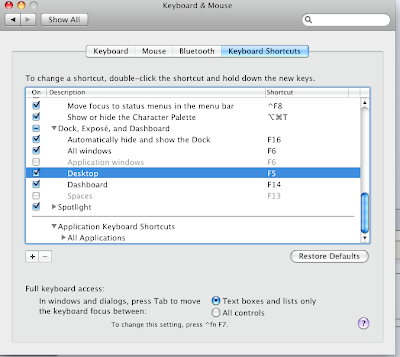
or
2. Exposé
Mac OS X offers a simple way to see what's on your desktop when you have a lot of windows open. It’s called Exposé, and here’s how you can use it. Press the F9 key and Exposé instantly creates thumbnails of the open windows and displays them neatly on your screen. Click the window you want, and Exposé brings it to the front, switching automatically to the appropriate application.
You can press the F10 key to create thumbnails of the open windows of your current application. Or F11 to move all open windows to the side, so you can see the files on your desktop.
You can press the F10 key to create thumbnails of the open windows of your current application. Or F11 to move all open windows to the side, so you can see the files on your desktop.

Thursday, December 9, 2010
Best Media Player for Mac OSX
Best Media Player for Mac OSX
No 1. Movist (5 Stars *****)
http://code.google.com/p/movist/downloads/list
No 2, mplayerx (not mplayer) (4 Stars ****)
http://code.google.com/p/mplayerx/downloads/list
No 1. Movist (5 Stars *****)
http://code.google.com/p/movist/downloads/list
No 2, mplayerx (not mplayer) (4 Stars ****)
http://code.google.com/p/mplayerx/downloads/list
Thursday, December 2, 2010
Harmony Remote and Apple TV, iMac... issues
Apple TV
If after updating your Harmony Remote the Apple TV does not respond, please follow these steps:- Press the Device button on your Harmony.
- Select the Apple TV. It will be listed as a Media Center PC.
- Hold the Harmony within 3 inches of the Apple TV.
- From the LCD of your Harmony, select the command Unpair.
I want to control more than one Apple device with my Harmony Remote:
If you have more than one Apple product that you wish to control with your Harmony, you will need to pair the Harmony with those devices.
- Press the Device button on your Harmony.
- Select your Apple device (for example, an iPod will be listed as Digital Music Server, an iMac or Apple TV as a Media Center PC)
- Hold the Harmony within 3 inches of the Apple product.
- Ensure all other Apple devices are powered off so that they do not pair to the same remote language.
- From the LCD of your Harmony, select the command Pair.
Subscribe to:
Posts (Atom)