Showing posts with label SQL Server. Show all posts

Tuesday, November 6, 2012

Backup SQL Server Database to a network shared drive

Prerequisite: The steps are applicable on machines running under “Domain Account”.
Step # 1. Map the network drive: EXEC xp_cmdshell 'net use '
Example: EXEC XP_CMDSHELL 'net use H: \\machinename\sharename'
Step # 2. Verify drive mapping:
Example: EXEC XP_CMDSHELL 'Dir H:'
Once done, you will be able to view the network mapped drive from Backup/Restore GUI.
Step # 3 (Optional). Delete the network map drive
Example: EXEC XP_CMDSHELL 'net use H: /delete'

NOTE
: Only flipside is that this network drive mapping will remain till next SQL Server Service restart. So, To make above 'Network Drive mapping’ Permanent follow either of below options
Option 1. – Using Backup Device
- After completing Step # 1. and Step # 2. Create a “Backup Device” for above network mapped drive. For details refer >> How to: Define a Logical Backup Device for a Disk File
- Once “Backup Device” is created, network mapped drive will be visible across SQL Server reboot.
Option 2. – Using “start-up” Stored Procedure
Step 1. Create a Procedure
CREATE PROC map_drive_satrtup
As 
EXEC xp_cmdshell 'net use  ' 
Step 2.  Set Procedure Options
sp_procoption  @ProcName = 'map_drive_satrtup' 
, @OptionName = 'startup' 
, @OptionValue = 'on' 
 
While using XP_CMDSHELL option, if you get below ERROR????
Msg 15281, Level 16, State 1, Procedure xp_cmdshell, Line 1
SQL Server blocked access to procedure 'sys.xp_cmdshell' of component 'xp_cmdshell' because this component is turned off as part of the security configuration for this server. A system administrator can enable the use of 'xp_cmdshell' by using sp_configure.
The above error clearly indicates that you need to ENABLE xp_cmdshell. Use below command:
-- To allow advanced options to be changed.
EXEC sp_configure 'show advanced options', 1
GO
-- To update the currently configured value for advanced options.
RECONFIGURE
GO
-- To enable the feature.
EXEC sp_configure 'xp_cmdshell', 0
GO
-- To update the currently configured value for this feature.
RECONFIGURE
GO

Tuesday, October 30, 2012

Database Mail to send alerts when SQL Server Agent jobs fail

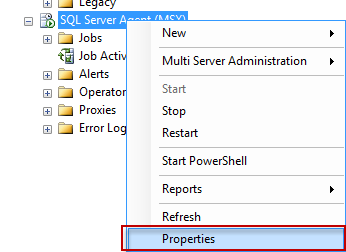
right-click SQL Server Agent (The MSX suffix in the screenshot is due to the Agent on this particular server acting as the Master in a multi-sevrer job administration) and select "Properties":
In the SQL Server Agent properties, head to the "Alert System" page, and there, in the Mail Session part of the page, check the box next to "Enable mail profile" to enable mail, and under "Mail System", set it to "Dabatase Mail". Under "Mail Profile", set it to "SQL Server Mail":

 Click "OK", right-click the "Operators" folder under SQL Server Agent, and select "New operator":

Define a name for the profile, and enter the mail account you want the mail to be sent to:
To ensure things will work correctly, it is usually a good idea to restart SQL Server Agent at this stage. This can be done either from SQL Server Configuration Manager, or directly from SQL Server Management Studio (SSMS) by right-clicking SQL Server Agent, and then selecting "Restart":

In the agent job general section, the only thing I filled out was the name: "Failing Job". In the "Steps" section, I created a new job step that selects data from a non-existing table in a non-existing database:
Then, on the "Notifications" page, I selected to have a mail sent to the profile created earlier if the job fails:
If all went well, you should receive a mail notifying you of the the job failure:

Wednesday, July 4, 2012

Replicatioin Configuration Problem Error -- SQL Server is unable to connect to server (Configure Distribution Wizard)


sp_helpserver
--SELECT @@ServerName

you will see error servename like,
--WIN08R2-666 WIN08R2-666--rpc,rpc out,use remote collation 0   NULL 0 0

sp_dropserver 'WIN08R2-666'
--to remove it and

sp_addserver 'WIN08R2-342', 'LOCAL'
--add the server name.

System.Data.SqlClient.SqlError -When Restoring a Database to SQL Server


restore a database backup to SQL Server 2008 and he got the following error


Msg 3176, Level 16, State 1, Line 1 File 'D:\SQL Server 2008 DBs\test01.mdf' is claimed by 'SCTA_ORG_SECOND'(3) and 'SCTA_ORGANIZATION'(1). The WITH MOVE clause can be used to relocate one or more files.
Msg 3013, Level 16, State 1, Line 1
RESTORE DATABASE is terminating abnormally

let's resolve this error then we will explain the reason of this error so at the same screen used for restoring database of Microsoft SQL Server Management Studio 


select Script Action to New Query Window as the above image so you will get the following T-SQL and here we will know the reason


RESTORE DATABASE [test01] FROM  DISK = N'D:\SCTA_Org2.bak' WITH  FILE = 1,
    MOVE N'SCTA_ORGANIZATION' TO N'D:\SQL Server 2008 DBs\test01.mdf',
    MOVE N'SCTA_ORG_SECOND' TO N'D:\SQL Server 2008 DBs\test01.MDF',
    MOVE N'SCTA_ORGANIZATION_log' TO N'D:\SQL Server 2008 DBs\test01_1.ldf',
    NOUNLOAD,  STATS = 10
GO

so you will notice there are two files of mdf with the same name so just change the name of second one to test02 or to test01.ndf ( different extension) then run the command and it's successfully restored.

so the logical answer for this error first test01.mdf is a primary data file and the second is the secondary data file but the extension and name are same so that way you have to change the name or extension of second file with any other name or extension.

Note: the extension is anything ( it can be .fad or .ndf but .ndf is best practice to determine what this file for for example .ldf for log file , .ndf  for secondary data files ..).

Finally : I think the original database backup come from SQL Server 2000 and maybe this behavior allowed in SQL Server 2000 or the name is a case sensitive ( test01.mdf not like test01.MDF).


source: http://sqlgoogler.blogspot.ca/2011/01/systemdatasqlclientsqlerror-when.html

Friday, June 29, 2012

start IDENTITY values at a new seed

This can be useful if you want to create an artificial gap between your current seed and your desired next identity value.

SET IDENTITY_INSERT [myTable] OFF
INSERT INTO [myTable] (id,other)
    VALUES(@NewSeed,'something')
SET IDENTITY_INSERT ON [myTable] ON 

In this case, the id column will continue incrementing from the vaue of @NewSeed.

If you want to remove all entries in a table and start over at 1 (or a non-default seed), you can do one of two things:

DROP TABLE [myTable]
CREATE TABLE [myTable]
(
    -- Column definition
)

-- or

TRUNCATE TABLE [myTable]

Note that TRUNCATE TABLE will not work in particular scenarios, e.g. if another table has a foreign key constraint pointing at the table you're trying to reset (even if there is no data representing that relationship). What you can do instead is:

DELETE [myTable] -- assuming you want to clear the data
DBCC CHECKIDENT('myTable', RESEED, 0)

The final parameter is a little awkward. If you want to make sure that the next IDENTITY value that gets generated is 1, you set this value to 0 (this is the typical case). If you want to inject a gap into the IDENTITY sequence, let's say you want the next IDENTITY to be 25000, you would say:

DBCC CHECKIDENT('myTable', RESEED, 24999)

Of course, that all assumes that your increment value is 1. If your increment value is 50, you would use 24950 instead of 24999.

It's not a great idea to reseed an IDENTITY sequence *lower* than any values that currently exist in the table. You might get a little surprise when your counter gets back up that high and hits an existing value...


For Access, you can reset the AUTONUMBER column by compacting and repairing the database (see Article #2190). Though with certain version / JET combinations, this can cause the engine to fill gaps when you start inserting again. KB #257408 explains this to some degree, but states that it will only use numbers lower than the max that was ever in the table, if all higher numbers have been deleted (e.g. won't fill gaps). There are several documented cases out on Google where users have observed their gaps being filled in, even when higher numbers still exist in the data. So I wouldn't count on your gaps staying intact.

source: http://sqlserver2000.databases.aspfaq.com/can-i-start-identity-values-at-a-new-seed.html

SQL Server Int Maximum Value


bigInt -9223372036854775808 through 9223372036854775807 (8 bytes)
int -2147483648 through 2147483647 (4 bytes)
smallInt -32768 through 32767 (2 bytes)
tinyInt 0 through 255 (1 byte)

Reset all identities in SQL Server


As using query from http://beyondrelational.com/justlearned/posts/169/get-all-the-tables-and-columns-having-identity-propertly-sql-server.aspx , herewith script to reset all identities for all tables in database.
01.DECLARE @sql varchar(8000)
02.DECLARE @tbl VARCHAR(4000)
03.DECLARE @col VARCHAR(4000)
04.DECLARE c_ident cursor FAST_FORWARD FOR 
05.SELECT table_name,column_name
06.FROM
07.INFORMATION_SCHEMA.COLUMNS
08.WHERE
09.COLUMNPROPERTY -- checking for identity = 1
10.(
11.OBJECT_ID(QUOTENAME(table_schema) + '.' + QUOTENAME(table_name))
12.,column_name
13.,'isidentity'
14.) = 1
15.OPEN c_ident
16.FETCH NEXT FROM c_ident INTO @tbl,@col
17.WHILE @@FETCH_STATUS = 0
18.BEGIN
19.SET @SQL = '
20.DECLARE @RESEEDIDENT BIGINT
21.SET @RESEEDIDENT  = (select ISNULL(max('+@col+'),0) from '+@tbl+')
22.DBCC CHECKIDENT ( '''+@tbl+''', RESEED, @RESEEDIDENT )
23.'
24.PRINT (@SQL)
25.EXEC(@SQL)
26.FETCH NEXT FROM c_ident INTO @tbl,@col
27.END
28.CLOSE c_ident
29.DEALLOCATE c_ident

source: http://beyondrelational.com/modules/1/justlearned/388/tips/8593/reset-all-identities-in-sql-server.aspx

Tuesday, June 12, 2012

How to: Configure Express to accept remote connections


914277 How to configure SQL Server 2005 to allow remote connections
http://support.microsoft.com/default.aspx?scid=kb;EN-US;914277
-----------------------------------------------------------------------------------
Some people have been having issues when trying to make remote connections  to SQL Express.  This document will hopefully clarify most of the issues  around remote connections.

First, networking protocols are disabled by default in SQL Server Express.  Thus, if someone simply installs Express and chooses all the defaults, SQL  Server Express will only be able to have connections originating on the  local machine where SQL Server is installed.

To enable SQL Server Express to accept remote connections we need to perform  the following steps:
STEP 1: Enabling TCP/IP
First we must tell SQL Server Express to listen on TCP/IP, to do this perform the following steps:
1. Launch the SQL Server Configuration Manager from the "Microsoft SQL Server 2005 CTP" Program menu
2. Click on the "Protocols for SQLEXPRESS" node,
3. Right click on "TCP/IP" in the list of Protocols and choose, "Enable"

STEP 2: To Browse or not to Browse
Next, we have to determine if we want the SQL Browser service to be running or not.  The benefit of having this service run is that users connecting remotely do not have to specify the port in the connection string.  Note: It is a security best practice to not run the SQLBrowser service as it reduces the attack surface area by eliminating the need to listen on an udp port.

OPTION A: If you want to always specify a TCP port when connecting (Not using SQL Browser service) perform the following steps else skip these
steps:
1.      Launch the SQL Server Configuration Manager from the "Microsoft SQL Server 2005 CTP" Program menu
2.      Click on the "Protocols for SQLEXPRESS" node
3.      Click on the "TCP/IP" child node
4.      You will notice an entry on the right panel for "IPAll", right click on this and select, "Properties"
5.      Clear out the value for "TCP Dynamic Ports"
6.      Give a TcpPort number to use when making remote connections, for
purposes of this example lets choose, "2301"

At this point you should restart the SQL Server Express service.  At this point you will be able to connect remotely to SQL Express.  A way I like to check the connection is my using SQLCMD from a remote machine and connecting like this:
SQLCMD -E -S YourServer\SQLEXPRESS,2301
The "," in the server name tells SQCMD it's a port.

So you've tried this and still get an error.  Take a look at Step 3, this should address the remaining issue.

OPTION B:  If you want to use SQL Browser service perform these steps:
            Note:
            You will need to make this registry key change if you are using the April
            CTP or earlier versions:

            To enable sqlbrowser service to listen on the port 1434, the following
            registry key must be set to 1
            HKEY_LOCAL_MACHINE\SOFTWARE\Microsoft\Microsoft SQL Server\90\SQL
            Browser\Ssrplistener

            Next, restart the sqlbrowser service.
      1. Start the SQL Browser Service

STEP 3: Firewall..?
      At this point you should be able to remotely connect.  If you still can't chances are you have a firewall configured on the computer where SQL  Express is running.  The instructions below are for Windows XP SP2's
firewall settings.
      To enable the firewall to allow SQL Server Express traffic:
         1. Launch the Windows Firewall configuration tool from the control  panel.
         2.Click the Exceptions Tab
         3.Click the "Add Programs." button and select "sqlservr.exe" from the location where you install SQL Server Express

You should be able to remotely connect.  Note, you can get more restrictive  by just specifying the port number that will be allowed (used best when  configured with Option A).

Note: If you chose to use the SQL Browser service, you must also add  sqlbrowser service executable to the exception list as it listens on udp port 1434.

source: http://blogs.msdn.com/b/sqlexpress/archive/2005/05/05/415084.aspx

Wednesday, September 14, 2011

How to delete database data file

1.DBCC SHRINKFILE('logical_file_name', EMPTYFILE).
2.After that, the file dropped with no problems.

Sunday, August 21, 2011

How to move TempDB to another drive.

Open Query Analyzer and connect to your server. Run this script to get the names of the files used for TempDB.
USE TempDB
GO
EXEC sp_helpfile
GO

Results will be something like:
name fileid filename filegroup size
——- —— ————————————————————– ———- ——-
tempdev 1 C:Program FilesMicrosoft SQL ServerMSSQLdatatempdb.mdf PRIMARY 16000 KB
templog 2 C:Program FilesMicrosoft SQL ServerMSSQLdatatemplog.ldf NULL 1024 KB
along with other information related to the database. The names of the files are usually tempdev and demplog by default. These names will be used in next statement.
=========================================

Run following code, to move mdf and ldf files.

USE master
GO
ALTER DATABASE TempDB MODIFY FILE
(NAME = tempdev, FILENAME = 'd:datatempdb.mdf')
GO
ALTER DATABASE TempDB MODIFY FILE
(NAME = templog, FILENAME = 'e:datatemplog.ldf')
GO

The definition of the TempDB is changed. However, no changes are made to TempDB till SQL Server restarts. Please stop and restart SQL Server and it will create TempDB files in new locations.

Wednesday, August 3, 2011

SQL Server 2008镜像实例

SQL Server 2008镜像的运行模式有3种:1.高性能(异步)2.不带自动故转移功能障的高安全(同步)3.带自动故转移功能障的高安全(同步)。前段时间,为某区市的两台监察数据库做了镜像,模式为高性能(异步),不使用见证服务器。现将步骤总结如下:
1.场景为主体服务器和镜像服务器都没有加入域,在工作组中。
2.主体服务器和镜像服务器上的SQL主服务账户都指定为.\Administrator,并且密码一致。
3.主体服务器和镜像服务器上都在防火墙上设置例外“sqlmirror-5022”,打开TCP5022端口。
4.主体服务器上的准备镜像的数据库LS_SUPERVISIONDB恢复模式必须指定为完整。
5.在主体服务器上不仅要备份数据库文件,还要备份事务日志文件(必须指定为截断选项),用企业管理器操作即可。
6.在镜像服务器分别还原数据库文件和事务日志文件,必须指定为RESTORE WITH NORECOVERY选项。
7.在主体服务器上用企业管理器开始设置镜像,运行模式制定为高性能(异步)。在制定服务账户步骤时,主体和镜像都指定为空即可。
8.镜像成功后,主体服务器显示(主体,已同步),镜像服务器显示(正在还原...)。
以上就是建立镜像的几个步骤。
另外,讲一下如何进行故障恢复的方法。主服务器Down掉后,备机紧急启动并且开始服务的方法:在镜像服务器上执行
USE master
ALTER DATABASE LS_SUPERVISIONDB SET PARTNER FORCE_SERVICE_ALLOW_DATA_LOSS
以上代码执行成功后,镜像服务器上的LS_SUPERVISIONDB显示状态为(主体,已断开连接)。

主体服务器开机后,镜像服务器未进行主备切换前的状态如下:
镜像服务器上LS_SUPERVISIONDB显示状态为(主体,挂起)
主体服务器上LS_SUPERVISIONDB显示状态为(正在还原...)

原来的主服务器恢复,可以继续工作,需要重新设定镜像。将主体服务器启动后,在镜像服务器上执行
USE master
ALTER DATABASE LS_SUPERVISIONDB SET PARTNER RESUME; --恢复镜像
ALTER DATABASE LS_SUPERVISIONDB SET PARTNER SAFETY FULL --事务安全,同步模式
ALTER DATABASE LS_SUPERVISIONDB SET PARTNER FAILOVER; --切换主备
以上代码执行成功后,主体服务器显示(主体,已同步),镜像服务器显示(正在还原...)。在主体服务器上使用企业管理器将镜像的运行模式由“不带自动故转移功能障的高安全(同步)”改为高性能(异步)。到此,一次故障转移成功实现。

source: http://www.cnblogs.com/qdzhbsh/archive/2010/12/03/1895664.html

数据库服务器高可用、高性能和高保护配置

很多公司保护数据,最先用到的基本都是备份(这个是必不可少,也是最节约成本的方法了),基本的备份有三种,全备、差异和日志(当然还有基于文件、文件 组、Page等的备份方案,不做讨论),如何合理的安排这些备份计划,需要根据应用系统的业务要求和特点来定,还得考虑备份文件的保留时间、备份频率等。
本地备份
image
但是随着数据量的增加,同时考虑一些安全性的原因,将数据都保存到本机硬盘的方案变得不可取,于是考虑购买一台磁带机,将备份的数据从本地磁盘,转 移到磁带机上,本地磁盘只保留一份最新的全套备份;一方面可以解决磁盘空间问题,同时还将数据备份到了其他设备中,增强了数据的安全性。
磁带机备份
image
有了完善的数据库备份方案,视乎我们的数据得到了有效的保护,但是想象下,如果我们的服务器真出现故障,服务器起不来了,该怎么做呢?当然是按我们 的备份计划,将数据从最新的全备份开始,然后差异,然后再日志还原过来;假定我们的备份文件100%的可用(不可用的情况也经常发生哦),如果数据库小, 那不久就可以还原好,但是如果是个几百G的数据库,要按这样一步步还原,而此时后面一堆人都挂着等你的数据库恢复,boss过两分钟过来问下情况,手里的 电话被各个需要使用的部门打爆…,这时候没有强悍的心理素质,估计早就崩溃了;并且备份还有时间选择,比方你一个小时备份一个日志文件,但是如果数据库某 天运行到1:50分左右突然挂掉了,此时如果备份不到最后50分钟的日志信息,那你这50分钟所产生的数据就找不回了。
正因为这样的备份恢复方案无法达到我们及时恢复数据库和最大限度保障数据的要求,于是我们不得不考虑其他更快恢复数据并减少数据丢失的方案,我们先 考虑SQLServer给我们提供的方案(硬件方案后面讨论),数据库里面有两种技术方案可以使用,一种是Mirroring,另一种是Log shipping(两种技术的细节这里不讨论)。
Mirroring/Logshipping
image
有了mirroring和log shipping(称备机),我们不但缩短了数据库恢复的时间,减少了数据丢失的可能,还可以将某些不需要完全实时的操作放到备机上(如:BI抽取数据, 做报表等),真是一举两得;不过,采取Mirroring和Logshipping会增加服务器的负担(不过一般都可以接受),Mirroring技术的 高安全性可以最大限度保护数据不丢失,但对主服务器影响较大(需要等待备服务器响应和回传信息),高可用性能提高恢复数据库上线的速度,但是需要增加一台 见证机,高可用性对数据的保护要稍微差点(主要取决于服务器性能和网络带宽),但对主服务器性能影响较小;而Log shipping是定期备份日志,然后传到备机上还原,数据丢失多少取决于备份和传送的频率,同时这两项技术还增加了部分硬件投入(需要备机)。
这样做之后,对一些普通的系统基本都可以应付了,但是对那些需要7×24小时不间断提供服务的应用还是有所不足;例如:如果我们数据库服务器一块网 卡坏了,或者操作系统崩溃了(但数据库本身没问题),那我们不得不停止业务来进行更换网卡或者启用备机来提供服务,影响了业务的进行;想象一下,淘宝这类 的在线交易购物网站,一天的交易笔数有多少,当机一分钟都可能有上千万的损失(个人估计,没实际调研,淘宝也不用SQLServer,呵呵),为应对这些 在线时间要求高的情况,我们的Cluster就应运而生了。
Cluster通过用两台服务器来连接一个数据库(形式有多种),也就是说两套硬件服务器和两套操作系统来支持一个数据库系统的运行,数据都存放到 磁盘阵列中,磁盘阵列可以采用Raid技术来提供磁盘的冗余;这样相当于为SQLServer提供了两套访问设备,一套坏了,另一套立马可以顶替过来,这 大大缩短了故障恢复的时间,差不多只相当于重启了一次数据库而已,(当然还有资源转移的时间,但一般不会太长),不过这样设备投入就更多了。
Cluster
image
通过这些技术后,数据保护和在线能力都有了很大的提高,但是这么多的操作都集中到了存储上,当访问量很大时,存储就成了数据库系统的瓶颈,那该如何 处理呢?有两种思路,一提高存储系统的性能,使用转速更快,性能更好的磁盘,所以现在出现了很火的SSD;二拆分业务或者是使用读写分离,将对一台数据库 的访问分散到多台机器上,减轻单台的压力。
SSD磁盘
image
读写分离
image
业务拆分
image
这样就足够了吗?知道911吗?像911那样的事故,可能我们都不会遇到,但是,电信机房起火事件发生的概率还是有的(里面机器多呀),如果这样的 情况发生,如果我们没有提前做好应对方案的话,一切就都over了;于是异地容灾就被提出来了,主要有异地备份和异地机房方案(异地备份就不讲啦);如果 建了异地机房,那怎么样同步数据就是个头大的问题,目前大部分硬件提供商提供的方案是磁盘同步的方案,两地机房之间用光纤相连(成本呀),当A机房的某个 磁盘写数据时,通过光纤将这些数据传到B机房对应的磁盘上,这样就完成了两个磁盘数据的同步(至于这个同步有多大的延时,就不好说啦);A、B机房采用同 样的架构,正常情况下只有A机房的磁盘对外提供服务,B机房的磁盘不提供对外访问(起码不能写),一旦A机房真的被毁了,那B机房的这些设备就可以开启, 用来提供对外的服务。
异地容灾(磁盘同步技术)
image

Thursday, July 14, 2011

统计数据库各个表所占空间的sql script

create table #t(name varchar(255), rows bigint, reserved varchar(20), data varchar(20), index_size varchar(20), unused varchar(20))
exec sp_MSforeachtable "insert into #t exec sp_spaceused '?'"
select * from #t
drop table #t

SQL Server script to rebuild all indexes for all tables and all databases

Problem

One of the main functions of a DBA is to maintain database indexes.  There have been several tips written about different commands to use for both index rebuilds and index defrags as well as the differences between index maintenance with SQL Server.  In addition, other tips have been written about using maintenance plans to maintain indexes on all databases.  One of the issues with maintenance plans is that they don't always seem to be as reliable as you would hope and you also sometimes get false feedback on whether the task actually was successful or not.  In this tip we look at a simple script that could be used to rebuild all indexes for all databases.

Solution

The one nice thing about maintenance plans is that it works across multiple databases and therefore you can push out one task to handle the same activity across all of your databases.  The problem that I have seen with maintenance plans is that sometimes they do not work as expected, therefore here is another approach.
The script below allows you to rebuild indexes for all databases and all tables within a database.  This could be further tweaked to handle only indexes that need maintenance as well as doing either index defrags or index rebuilds.
The script uses two cursors one for the databases and another for the tables within the database.  In addition, it uses the INFORMATION_SCHEMA.TABLES view to list all of the tables within a database. 
Because we need to change from database to database we also need to create dynamic SQL code for the queries.  For the DBCC DBREINDEX option we can just pass in the parameters, but for the ALTER INDEX statement we need to build the query dynamically.  Here is the script.
DECLARE @Database VARCHAR(255)   DECLARE @Table VARCHAR(255)  DECLARE @cmd NVARCHAR(500)  DECLARE @fillfactor INT

SET
@fillfactor = 90
DECLARE DatabaseCursor CURSOR FOR
SELECT
name FROM MASTER.dbo.sysdatabases   WHERE name NOT IN ('master','msdb','tempdb','model','distribution')   ORDER BY 1
OPEN DatabaseCursor
FETCH NEXT FROM DatabaseCursor INTO @Database  WHILE @@FETCH_STATUS = 0  BEGIN

   SET
@cmd = 'DECLARE TableCursor CURSOR FOR SELECT ''['' + table_catalog + ''].['' + table_schema + ''].['' +
  table_name + '']'' as tableName FROM '
+ @Database + '.INFORMATION_SCHEMA.TABLES
  WHERE table_type = ''BASE TABLE'''  

  
-- create table cursor
  
EXEC (@cmd)
  
OPEN TableCursor  

  
FETCH NEXT FROM TableCursor INTO @Table  
  
WHILE @@FETCH_STATUS = 0  
  
BEGIN  

       IF
(@@MICROSOFTVERSION / POWER(2, 24) >= 9)
      
BEGIN
          
-- SQL 2005 or higher command
          
SET @cmd = 'ALTER INDEX ALL ON ' + @Table + ' REBUILD WITH (FILLFACTOR = ' + CONVERT(VARCHAR(3),@fillfactor) + ')'
          
EXEC (@cmd)
      
END
       ELSE
       BEGIN
          
-- SQL 2000 command
          
DBCC DBREINDEX(@Table,' ',@fillfactor)
      
END

       FETCH
NEXT FROM TableCursor INTO @Table  
  
END  

   CLOSE
TableCursor  
  
DEALLOCATE TableCursor

  
FETCH NEXT FROM DatabaseCursor INTO @Database  END
CLOSE
DatabaseCursor   DEALLOCATE DatabaseCursor
The script will work for both SQL 2000 and higher versions.  For SQL 2000 it uses DBREINDEX and for SQL Server 2005 and higher it uses ALTER INDEX.  Thanks go out to LittlePanthers for providing the code snippet to check the version of SQL Server.
Also, I have excluded the system databases, so you can include these or also add other databases to exclude from you index maintenance routines.

Next Steps

  • This is a simple base script that could be modified into a stored procedure and also allow you to pass other parameters such as doing an index rebuild or an index defrag.
  • Make the index rebuild statements more robust with other options.
  • You could also modify this to read from a table that you create to identify which databases and which indexes you want to run this against.  You can look at index fragmentation and only rebuild the indexes that need to be rebuilt.
  • This approach rebuilds all indexes, so be careful if you run this on very large indexes.

Index Fragmentation Report in SQL Server 2005 and 2008

ProblemWhile indexes can speed up execution of queries several fold as they can make the querying process faster, there is overhead associated with them. They consume additional disk space and require additional time to update themselves whenever data is updated, deleted or appended in a table. Also when you perform any data modification operations (INSERT, UPDATE, or DELETE statements) index fragmentation may occur and the information in the index can get scattered in the database. Fragmented index data can cause SQL Server to perform unnecessary data reads and switching across different pages, so query performance against a heavily fragmented table can be very poor. In this article I am going to write about fragmentation and different queries to determine the level of fragmentation.
SolutionWhen indexes are first built, little or no fragmentation should exist. Over time, as data is inserted, updated, and deleted, fragmentation levels on the underlying indexes may begin to rise. So let's see how it happens.
When a page of data fills to 100 percent and more data must be added to it, a page split occurs. To make room for the new incoming data, SQL Server moves half of the data from the full page to a new page. The new page that is created is created after all the pages in the database. Therefore, instead of going right from one page to the next when looking for data, SQL Server has to go from one page to another page somewhere else in the database looking for the next page it needs. This is called index fragmentation.
There are basically two types of fragmentation:
  • External fragmentation - External, a.k.a logical,  fragmentation occurs when an index leaf page is not in logical order, in other words it occurs when the logical ordering of the index does not match the physical ordering of the index. This causes SQL Server to perform extra work to return ordered results. For the most part, external fragmentation isn’t too big of a deal for specific searches that return very few records or queries that return result sets that do not need to be ordered.
  • Internal fragmentation - Internal fragmentation occurs when there is too much free space in the index pages. Typically, some free space is desirable, especially when the index is created or rebuilt. You can specify the Fill Factor setting when the index is created or rebuilt to indicate a percentage of how full the index pages are when created. If the index pages are too fragmented, it will cause queries to take longer (because of the extra reads required to find the dataset) and cause your indexes to grow larger than necessary. If no space is available in the index data pages, data changes (primarily inserts) will cause page splits as discussed above, which also require additional system resources to perform.
As we learned, heavily fragmented indexes can degrade query performance significantly and cause the application accessing it to respond slowly. So now the question is how to identify the fragmentation. For that purpose SQL Server 2005 and 2008 provide a dynamic management function (DMF) to determine index fragmentation level. This new DMF (sys.dm_db_index_physical_stats) function accepts parameters such as the database, database table, and index for which you want to find fragmentation. There are several options that allow you to specify the level of detail that you want to see in regards to index fragmentation, we will see some of these options in the examples below.
The sys.dm_db_index_physical_stats function returns tabular data regarding one particular table or index.
Input Parameter Description
database_id The default is 0 (NULL, 0, and DEFAULT are equivalent values in this context) which specify to return information for all databases in the instance of SQL Server else specify the databaseID from sys.databases if you want information about a specific database. If you specify NULL for database_id, you must also specify NULL for object_id, index_id, and partition_number.
object_id The default is 0 (NULL, 0, and DEFAULT are equivalent values in this context) which specify to return information for all tables and views in the specified database or else you can specify object_id for a particular object. If you specify NULL for object_id, you must also specify NULL for index_id and partition_number.
index_id The default is -1 (NULL, -1, and DEFAULT are equivalent values in this context) which specify to return information for all indexes for a base table or view. If you specify NULL for index_id, you must also specify NULL for partition_number.
partition_number The default is 0 (NULL, 0, and DEFAULT are equivalent values in this context) which specify to return information for all partitions of the owning object. partition_number is 1-based. A nonpartitioned index or heap has partition_number set to 1.
mode mode specifies the scan level that is used to obtain statistics. Valid inputs are DEFAULT, NULL, LIMITED, SAMPLED, or DETAILED. The default (NULL) is LIMITED.
  • LIMITED - It is the fastest mode and scans the smallest number of pages. For an index, only the parent-level pages of the B-tree (that is, the pages above the leaf level) are scanned. In SQL Server 2008, only the associated PFS and IAM pages of a heap are examined; the data pages of the heap are not scanned. In SQL Server 2005, all pages of a heap are scanned in LIMITED mode.
  • SAMPLED - It returns statistics based on a 1 percent sample of all the pages in the index or heap. If the index or heap has fewer than 10,000 pages, DETAILED mode is used instead of SAMPLED.
  • DETAILED - It scans all pages and returns all statistics.
Note
  • The sys.dm_db_index_physical_stats dynamic management function replaces the DBCC SHOWCONTIG statement. It requires only an Intent-Shared (IS) table lock in comparison to DBCC SHOWCONTIG which required a Shared Lock, also the algorithm for calculating fragmentation is more precise than DBCC SHOWCONTIG and hence it gives a more accurate result.
  • For an index, one row is returned for each level of the B-tree in each partition (this is the reason, if you look at image below, for some indexes there are two or more than two records for a single index; you can refer to the Index_depth column which tells the number of index levels). For a heap, one row is returned for the IN_ROW_DATA allocation unit of each partition. For large object (LOB) data, one row is returned for the LOB_DATA allocation unit of each partition. If row-overflow data exists in the table, one row is returned for the ROW_OVERFLOW_DATA allocation unit in each partition.
Example
Let’s see an example. The first script provided below gives the fragmentation level of a given database including all tables and views in the database and all indexes on these objects. The second script gives the fragmentation level of a particular object in the given database. The details about the columns and its meaning returned by the sys.dm_db_index_physical_stats are given in the below table.
Script : Index Fragmentation Report Script
--To Find out fragmentation level of a given database
--This query will give DETAILED information
--CAUTION : It may take very long time, depending on the number of tables in the DB
USE AdventureWorks
GO
SELECT object_name(IPS.object_id) AS [TableName], 
   SI.name AS [IndexName], 
   IPS.Index_type_desc, 
   IPS.avg_fragmentation_in_percent, 
   IPS.avg_fragment_size_in_pages, 
   IPS.avg_page_space_used_in_percent, 
   IPS.record_count, 
   IPS.ghost_record_count,
   IPS.fragment_count, 
   IPS.avg_fragment_size_in_pages
FROM sys.dm_db_index_physical_stats(db_id(N'AdventureWorks'), NULL, NULL, NULL , 'DETAILED') IPS
   JOIN sys.tables ST WITH (nolock) ON IPS.object_id = ST.object_id
   JOIN sys.indexes SI WITH (nolock) ON IPS.object_id = SI.object_id AND IPS.index_id = SI.index_id
WHERE ST.is_ms_shipped = 0
ORDER BY 1,5
GO
--To Find out fragmentation level of a given database and table
--This query will give DETAILED information
DECLARE @db_id SMALLINT;
DECLARE @object_id INT;
SET @db_id = DB_ID(N'AdventureWorks');
SET @object_id = OBJECT_ID(N'Production.BillOfMaterials');
IF @object_id IS NULL 
BEGIN
   PRINT N'Invalid object';
END
ELSE
BEGIN
   SELECT IPS.Index_type_desc, 
      IPS.avg_fragmentation_in_percent, 
      IPS.avg_fragment_size_in_pages, 
      IPS.avg_page_space_used_in_percent, 
      IPS.record_count, 
      IPS.ghost_record_count,
      IPS.fragment_count, 
      IPS.avg_fragment_size_in_pages
   FROM sys.dm_db_index_physical_stats(@db_id, @object_id, NULL, NULL , 'DETAILED') AS IPS;
END
GO

Returned Column Description
avg_fragmentation_in_percent It indicates the amount of external fragmentation you have for the given objects. The lower the number the better - as this number approaches 100% the more pages you have in the given index that are not properly ordered.
For heaps, this value is actually the percentage of extent fragmentation and not external fragmentation.
avg_page_space_used_in_percent It indicates how dense the pages in your index are, i.e. on average how full each page in the index is (internal fragmentation). The higher the number the better speaking in terms of fragmentation and read-performance. To achieve optimal disk space use, this value should be close to 100% for an index that will not have many random inserts. However, an index that has many random inserts and has very full pages will have an increased number of page splits. This causes more fragmentation. Therefore, in order to reduce page splits, the value should be less than 100 percent.
fragment_count A fragment is made up of physically consecutive leaf pages in the same file for an allocation unit. An index has at least one fragment. The maximum fragments an index can have are equal to the number of pages in the leaf level of the index. So the less fragments the more data is stored consecutively.
avg_fragment_size_in_pages Larger fragments mean that less disk I/O is required to read the same number of pages. Therefore, the larger the avg_fragment_size_in_pages value, the better the range scan performance.

Friday, July 8, 2011

SQL Server在什么样的条件下需要重建索引

 问:在什么样的条件下需要重建索引?
答:重建索引需要如下两个条件。
一:分析(analyze)指定索引之后,查询index_stats的height字段的值,如果这个值>=4 ,最好重建(rebuild)这个索引。虽然这个规则不是总是正确,但如果这个值一直都是不变的,则这个索引也就不需重建。
二:在分析(analyze)指定索引之后,查询index_stats的del_lf_rows和lf_rows的值,如果(del_lf_rows/lf_rows)*100 > = 20,则这个索引也需要重建。
举例如下:
SQL > analyze index IND_PK validate structure;
SQL > select name,height,del_lf_rows,lf_rows,
(del_lf_rows/lf_rows) *100 from index_stats;
NAME    HEIGHT DEL_LF_ROWS  LF_ROWS (DEL_LF_ROWS/LF_ROWS)*100
------------------------------
INDX_PK  4   277353   990206   28.0096263
SQL> alter index IND_PK rebuild;

统计SQL Server用户数据表大小

在SQL Server,简单的组合sp_spaceused和sp_MSforeachtable这两个存储过程,可以方便的统计出用户数据表的大小,包括记录总数和空间占用情况,非常实用,在SqlServer2K和SqlServer2005中都测试通过。
/**//*
1. exec sp_spaceused '表名'      (SQL统计数据,大量事务操作后可能不准)
2. exec sp_spaceused '表名', true    (更新表的空间大小,准确的表空大小,但可能会花些统计时间)
3. exec sp_spaceused          (数据库大小查询)
4. exec sp_MSforeachtable "exec sp_spaceused '?'"   (所有用户表空间表小,SQL统计数据,,大量事务操作后可能不准)
5. exec sp_MSforeachtable "exec sp_spaceused '?',true"  (所有用户表空间表小,大数据库慎用)
*/
create table #t(name varchar(255), rows bigint, reserved varchar(20), data varchar(20), index_size varchar(20), unused varchar(20))
exec sp_MSforeachtable "insert into #t exec sp_spaceused '?'"
select * from #t
drop table #t

另外还有sp_MSforeachdb可以遍历所有数据库,使用方法详见SQL帮助。

SQL Server调优经历(ZT)

前段时间数据库健康检查发现SQL Server服务器的idle时间变少,IO还是比较空闲,估计是遇到了高CPU占用的语句了。
介绍一下背景,我们公司负责运维N多的应有系统,负责提供良好的软、硬件环境,至于应用的开发质量,我们就无能为力了
解决这个问题,我的思路是:
找出CPU占用最大的语句。
分析查询计划。
优化。
1、找出语句
使用SQL Server自带的性能报表(不是报表服务),找出CPU占用最大的语句。如图1所示
一次SQL Server调优经历
图1 性能报表
我选取了“性能-按总CPU时间排在前面的查询”,得出以下两张报表,如图2所示:
一次SQL Server调优经历
图2 性能-按总CPU时间排在前面的查询
在报表中不能直接把语句Copy出来,非得让我另存为Excel才能Copy语句;而且经常标示不了是语句属于哪个数据库,不爽 :( 。
费了我九牛二虎之力才找出该条语句在哪个数据库执行,然后马上备份数据库,在另一个非生产数据库上面还原,创造实验环境。
废话少说,我把语句Copy出来,顺便整理了一下格式。如下:
select*
fromnetwork_listen
where
node_codein
(
selectdistinctnode_code
fromview_Log_Network_circsByUnit
wherestatus='1'
) 
or
node_code=
(
selecttop1nodeCode
fromTransmissionUnit_LocalInfo
) 
and
node_code<>
(
selectparentNodeCode
fromTransmissionUnit_RouterInfo
wherenodeCode=
(
selecttop1nodeCode
fromTransmissionUnit_LocalInfo
)
)


2、分析语句
执行计划如下:
图太大了,将就着看吧 :( .
一次SQL Server调优经历
图3 查询计划全图
一次SQL Server调优经历
图4 查询计划1
一次SQL Server调优经历
图5 查询计划2
一次SQL Server调优经历
图6 查询计划3
从整个查询计划来看,主要开销都花在了图5的那个部分——两个“聚集索引扫描”。
查看一下这两个数“聚集索引扫描”,搞什么飞机呢?
一次SQL Server调优经历 一次SQL Server调优经历
奇怪了,查询语句里面没有Log_Nwtwork_circs 这个表啊,再仔细分析一下这个执行计划,嫌疑最大的就是view_Log_Network_circsByUnit这个视图了。
查看一下这个试图的定义:
CREATEVIEW[dbo].[view_Log_Network_circsByUnit]
AS
SELECTB.*
FROM(
SELECTnode_code,MAX(end_time)ASend_time
FROMLog_Network_circs
GROUPBYnode_code
)A
LEFTOUTERJOIN
dbo.Log_Network_circsB
ON
A.node_code=B.node_code
AND
A.end_time=B.end_time


看着有点晕是吧,那么看看下图
一次SQL Server调优经历 
3、优化
SQL写得好不好,咱不说,反正我是不能改SQL的,而且应该可以判断出整个查询最耗时的地方就是用在搞这张试图了。
那就只能针对这个试图调优啦。仔细观察这个试图,实际上就涉及到一个表 Log_Network_circs,下面是该表的表结构:
CREATETABLE[dbo].[Log_Network_circs](
[log_id][varchar](30)NOTNULL,
[node_code][varchar](100)NULL,
[node_name][varchar](100)NULL,
[server_name][varchar](100)NULL,
[start_time][datetime]NULL,
[end_time][datetime]NULL,
[status][varchar](30)NULL,
CONSTRAINT[PK_LOG_NETWORK_CIRCS]PRIMARYKEYCLUSTERED
(
[log_id]ASC
)WITH(PAD_INDEX =OFF,STATISTICS_NORECOMPUTE =OFF,IGNORE_DUP_KEY=OFF,ALLOW_ROW_LOCKS =ON,ALLOW_PAGE_LOCKS =ON)ON[PRIMARY]
)ON[PRIMARY]

数据量有489957条记录,不算太大。
根据 3、经常与其他表进行连接的表,在连接字段上应该建立索引;
感觉上得在 node_code 和 end_time 这两字段上建立一个复合索引,大概定义如下:
CREATEINDEX[idx__Log_Network]
ONLog_Network_circs
(
node_codeASC,
end_timeASC
)

保险起见,我把需要调优的语句copy到一个文件里,然后打开“数据库引擎优化顾问”,设置好数据库,得出以下调优结果:

一次SQL Server调优经历
CREATESTATISTICS[_dta_stat_559341057_6_2]ON[dbo].[Log_Network_circs]([end_time],[node_code])
CREATENONCLUSTEREDINDEX[_dta_index_Log_Network_circs_24_559341057__K2_K6]ON[dbo].[Log_Network_circs]
(
[node_code]ASC,
[end_time]ASC
)WITH(SORT_IN_TEMPDB=OFF,IGNORE_DUP_KEY=OFF,DROP_EXISTING=OFF,ONLINE=OFF)ON[PRIMARY]

嗯,结果差不多,具体参数再说。
按照“数据库引擎优化顾问”给出的建议,建立 STATISTICS 和 INDEX 。
再看看优化后的执行计划
一次SQL Server调优经历
明显查询 view_Log_Network_circsByUnit 这个视图的执行计划不一样了。
一次SQL Server调优经历
不看广告,看疗效,使用统计功能。执行以下语句:
SETSTATISTICSIOon;
SETSTATISTICSTIMEon;

(2行受影响)
表'Log_Network_circs'。扫描计数2,逻辑读取13558次,物理读取0次,预读0次,lob逻辑读取0次,lob物理读取0次,lob预读0次。
表'TransmissionUnit_RouterInfo'。扫描计数0,逻辑读取2次,物理读取0次,预读0次,lob逻辑读取0次,lob物理读取0次,lob预读0次。
表'TransmissionUnit_LocalInfo'。扫描计数3,逻辑读取6次,物理读取0次,预读0次,lob逻辑读取0次,lob物理读取0次,lob预读0次。
表'network_listen'。扫描计数1,逻辑读取2次,物理读取0次,预读0次,lob逻辑读取0次,lob物理读取0次,lob预读0次。
SQLServer执行时间:
CPU时间=719毫秒,占用时间=719毫秒。
(2行受影响)
表'Log_Network_circs'。扫描计数2,逻辑读取9次,物理读取0次,预读0次,lob逻辑读取0次,lob物理读取0次,lob预读0次。
表'TransmissionUnit_RouterInfo'。扫描计数0,逻辑读取2次,物理读取0次,预读0次,lob逻辑读取0次,lob物理读取0次,lob预读0次。
表'TransmissionUnit_LocalInfo'。扫描计数3,逻辑读取6次,物理读取0次,预读0次,lob逻辑读取0次,lob物理读取0次,lob预读0次。
表'network_listen'。扫描计数1,逻辑读取2次,物理读取0次,预读0次,lob逻辑读取0次,lob物理读取0次,lob预读0次。
SQLServer执行时间:
CPU时间=0毫秒,占用时间=2毫秒。

逻辑读取数,总执行时间都大大缩减,开来调优还是挺成功的 :) 。

Monday, June 27, 2011

Understanding the Difference between Owners and Schemas in SQL Server

SQL Server 2005 introduces the concept of schemas as opposed to object owners found in previous versions. This article will explain the differences between the two and, hopefully, clear up some of the confusion that still exists about schemas.

Object owners

To understand the difference between owners and schema, let’s spend some time reviewing object ownership. When an object is created in SQL Server 2000 or earlier, the object must have an owner. Most of the time, the owner is “dbo”, also known as the database owner. It is possible that an object can be owned by any user account in the database. The way to determine the owner is by looking at the fully qualified object name which you can see using SQL Server Enterprise Manager or Management Studio when you are viewing a list of the tables. For example, the name of a table called orders owned by dbo is dbo.orders. If the table’s ownership is transferred to user abc, the table will now be named abc.orders.
How does an object get its owner? It depends on the user who created it. It is also possible for someone in the db_owner role to create an object owned by any user in the database. By default the user account that creates the object (the account must have CREATE TABLE permission) will also own the object. Only user accounts in the db_owner role can create objects owned by dbo. Even then, under certain circumstances, the owner will end up being the actual user account instead of dbo. See Undestanding Object Ownership for an in depth discussion of this issue
Using dbo as the owner of all the database objects can simplify managing the objects. You will always have a dbo user in the database. Users in the database will be able to access any object owned by dbo without specifying the owner as long as the user has appropriate permission. If an object is owned by an account other than dbo, the ownership must be transferred to another user if the original account is to be deleted. For example, if a non-dbo database user called “ted” creates the sales table, it will be called ted.sales. In order for users other than Ted to see the table, it must be referred to by the fully qualified name. If Ted leaves the company or department and his account must be removed from the database, the ownership of the table must be transferred to another user account using the sp_changeobjectowner stored procedure before Ted’s account can be removed.
If the table has been used in applications or referred to in any definitions such as stored procedures, changing the owner will now break all the code. If the dbo had owned the table from the start, there would have been no problem removing Ted’s account. The code would not have to use the fully qualified name, though there is a slight performance gain in doing so and is considered a best practice.

Schemas

I like to think of schemas as containers to organize objects. If you take a look at the AdventureWorks sample database (Figure 1), you will see that the tables are organized by department or function, such as “HumanResources” or “Production”. This looks similar to the old owner concept, but has many advantages. First of all, since the objects are not tied to any user accounts, you do not have to worry about changing the owner of objects when an account is to be removed. Another advantage is that the schemas can be used to simplify managing permissions on tables and other objects. The schema has an owner, but the owner is not tied to the name. So, if an account owns a schema and the account must be removed from the database, the owner of the schema can be changed without breaking any code. If you do not wish to organize your database objects into schemas, the dbo schema is available.
Viewing the fully qualified table name Figure 1: AdventureWorks tables with schemas.
Let’s say that the employees within the Widgets department are members of the same network security group, WidgetEmp. The managers of each department are members of an additional group, WidgetManagers. We create a schema called Widgets and many tables, views and stored procedures are contained in the Widgets schema. To control access to the objects, we could add the WidgetEmp and WidgetManagers network groups to the SQL Server and to the database. Because we are concerned about controlling access to tables, the WidgetEmp group has been given execute permission to all stored procedures in the Widget schema. The WidgetManagers group has also been given select permission to all the tables and views. The great thing about this is that you no longer have to remember to grant permission whenever a new stored proc, table or view is created as long as it is in the Widgets schema.
To grant execute permission to all stored procedures within a schema, follow these steps:
  • Using SQL Server Management Studio, expand Security then Schemas under the database.
  • Right-click on the schema name and choose Properties.
  • Select the permissions page and click Add to choose database users or roles.
  • Once the users or roles are selected, a list of permissions will fill the bottom box.
  • To grant execute permission to all stored procedures, check Grant next to the Execute item.
I have always wanted a database role that had execute permission on all stored procs. This would be similar to the db_datareader role. Now you can grant execute to all stored procs within a schema to achieve the desired result (see figure 2). I don’t know why a role like this doesn’t exist, but at least now there is a simple work-around. Even if you are not taking advantages of schemas in your database, you can give execute permission to stored procedures in the dbo schema to achieve the same result.
select and update permission on all tables and views in the schema Figure 2: Grant execute permission on all stored procedures in the schema.
One important thing to keep in mind if you want to take advantage of schemas is that the schema organization must be considered early on in the design of the database. Changing the schema design late in the game could cause many changes to code.

Upgrading your database

What happens if you upgrade a database from SQL Server 2000 to 2005? When a database is upgraded from 2000 to 2005, a schema for each user in the database is created. You may not even notice this until you attempt to remove one of the user accounts. At that point you will receive the error message “The database principal owns a schema in the database, and cannot be removed”. To solve this problem just delete the schema first as long as it is empty. If the schema is not empty, you will have to decide whether to delete the objects first or transfer the schema to another owner.

Conclusion

While the concept of schemas is confusing at first, it has many advantages once you figure it out. Just think of the schema as a container to organize objects and simplify granting permissions as opposed to the earlier notion of owner. Most importantly, the schema organization must be considered early in the design process to avoid problems with code later on. Finally, by granting Execute permission in a schema to an account or database role, we now have a way to make sure that users can always execute new stored procedures.

source: http://www.sqlteam.com/article/understanding-the-difference-between-owners-and-schemas-in-sql-server

重建索引提高SQL Server性能<转>

大多数SQL Server表需要索引来提高数据的访问速度,如果没有索引,SQL Server 要全表进行扫描读取表中的每一个记录才能找到所要的数据。索引可以分为簇索引和非簇索引:簇索引通过重排表中的数据来提高数据的访问速度;而非簇索引则通过维护表中的数据指针来提高数据的访问速度。

1. 索引的体系结构
        SQL Server 2005在硬盘中用8KB页 面在数据库文件内存放数据。缺省情况下这些页面及其包含的数据是无组织的。为了使混乱变为有序,就要生成索引。生成索引后,就有了索引页和数据页之分:数 据页用来保存用户写入的数据信息;索引页存放用于检索列的数据值清单(关键字)和索引表中该值所在纪录的地址指针。索引分为簇索引和非簇索引,簇索引实质 上是将表中的数据排序,就好像是字典的索引目录。非簇索引不对数据排序,它只保存了数据的地址。向一个带簇索引的表中插入数据,当数据页达到100%时,由于页面没有空间插入新的的纪录,这时就会发生分页,SQL Server 将 大约一半的数据从满页中移到空页中,从而生成两个1/2满页。这样就有大量的空的数据空间。簇索引是双向链表,在每一页的头部保存了前一页、后一页以及分 页后数据移出的地址。由于新页可能在数据库文件中的任何地方,因此页面的链接不一定指向磁盘的下一个物理页。链接可能指向了另一个区域,这就形成了分块, 从而减慢了系统的速度。对于带簇索引和非簇索引的表来说,非簇索引的关键字是指向簇索引的,而不是指向数据页的本身。
        为了克服数据分块带来的负面影响,需要重构表的索引,这是非常费时的,因此只能在需要时进行。可以通过DBCC SHOWCONTIG来确定是否需要重构表的索引。
2. DBCC SHOWCONTIG用法
        下面举例来说明DBCC SHOWCONTIGDBCC REDBINDEX的使用方法。以应用程序中Employee数据作为例子,在 SQL ServerQuery analyzer输入命令:
use database_name
declare @table_id int
set @table_id=object_id('Employee')
dbcc showcontig(@table_id)

 
输出结果:
 
DBCC SHOWCONTIG scanning 'Employee' table...
Table: 'Employee' (1195151303); index ID: 1, database ID: 53
TABLE level scan performed.
- Pages Scanned................................: 179
- Extents Scanned..............................: 24
- Extent Switches..............................: 24
- Avg. Pages per Extent........................: 7.5
- Scan Density [Best Count:Actual Count].......: 92.00% [23:25]
- Logical Scan Fragmentation ..................: 0.56%
- Extent Scan Fragmentation ...................: 12.50%
- Avg. Bytes Free per Page.....................: 552.3
- Avg. Page Density (full).....................: 93.18%
DBCC execution completed. If DBCC printed error messages, contact your system administrator.

 
通过分析这些结果可以知道该表的索引是否需要重构。如下描述了每一行的意义:
 
信息                                                          描述
Pages Scanned                           表或索引中的长页数
Extents Scanned                         表或索引中的长区页数
Extent Switches                          DBCC遍历页时从一个区域到另一个区域的次数
Avg. Pages per Extent              相关区域中的页数
Scan Density[Best Count:Actual Count]       
        Best Count是连续链接时的理想区域改变数,Actual Count是实际区域改变,
        Scan Density100%表示没有分块。
Logical Scan Fragmentation   扫描索引页中失序页的百分比
Extent Scan Fragmentation    不实际相邻和包含链路中所有链接页的区域数
Avg. Bytes Free per Page       扫描页面中平均自由字节数
Avg. Page Density (full)         平均页密度,表示页有多满

 
        从上面命令的执行结果可以看的出来,Best count23 Actual Count25。这表明orders表有分块,需要重构表索引。下面通过DBCC DBREINDEX来重构表的簇索引。
3. DBCC DBREINDEX 用法
        重建指定数据库中表的一个或多个索引。
语法
 
DBCC DBREINDEX
(    
    [ 'database.owner.table_name'    
        [ , index_name
            [ , fillfactor ]
        ]
    ] 
)      

 
参数
'database.owner.table_name'
        是要重建其指定的索引的表名。数据库、所有者和表名必须符合标识符的规则。有关更多信息,请参见使用标识符。如果提供 database owner 部分,则必须使用单引号 (') 将整个 database.owner.table_name 括起来。如果只指定table_name,则不需要单引号。
index_name
        是要重建的索引名。索引名必须符合标识符的规则。如果未指定 index_name 或指定为 ' ',就要对表的所有索引进行重建。
fillfactor
        是创建索引时每个索引页上要用于存储数据的空间百分比。fillfactor 替换起始填充因子以作为索引或任何其它重建的非聚集索引(因为已重建聚集索引)的新默认值。如果 fillfactor 0DBCC DBREINDEX 在创建索引时将使用指定的起始fillfactor
        同样在Query Analyzer中输入命令:
        dbcc dbreindex('database_name.dbo.Employee','',90)
        然后再用DBCC SHOWCONTIG查看重构索引后的结果:
 
DBCC SHOWCONTIG scanning 'Employee' table...
Table: 'Employee' (1195151303); index ID: 1, database ID: 53
TABLE level scan performed.
- Pages Scanned................................: 178
- Extents Scanned..............................: 23
- Extent Switches..............................: 22
- Avg. Pages per Extent........................: 7.7
- Scan Density [Best Count:Actual Count].......: 100.00% [23:23]
- Logical Scan Fragmentation ..................: 0.00%
- Extent Scan Fragmentation ...................: 0.00%
- Avg. Bytes Free per Page.....................: 509.5
- Avg. Page Density (full).....................: 93.70%
DBCC execution completed. If DBCC printed error messages, contact your system administrator.

 
        通过结果我们可以看到Scan Denity100%