Thursday, July 14, 2011

Using RS Scripter to backup/restore SSRS's report/subscription/roles...

f you are using SSRS then chances are high to come across a scenario where you want to deploy reports developed on development machine to the production server, there are various ways to do this and one of them is to use RS Scripter tool. Here are the steps to do this -

1. Creating Report Deployment Script

  1. Download the Reporting Services Scripter - http://www.sqldbatips.com/showarticle.asp?ID=62
  2. Update the servers.xml; change the reportservice value if your ReportServer name is different.


  3. Run the RSScripter.exe.
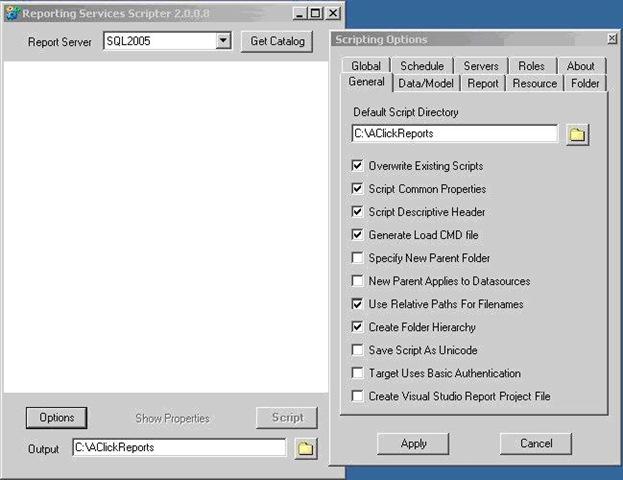
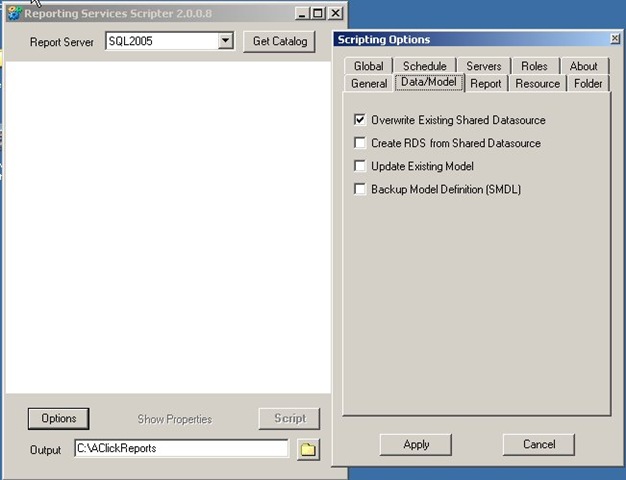
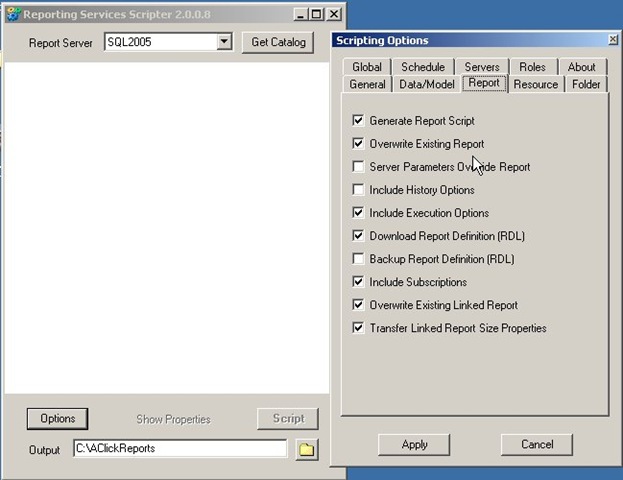
  4. Click on Options, and select the options selected in images below( for more information about Scripting Options check the readme file - http://www.sqldbatips.com/samples/code/RSScripter/readme.htm#_scripting_options) – clip_image001
    clip_image002
    clip_image003
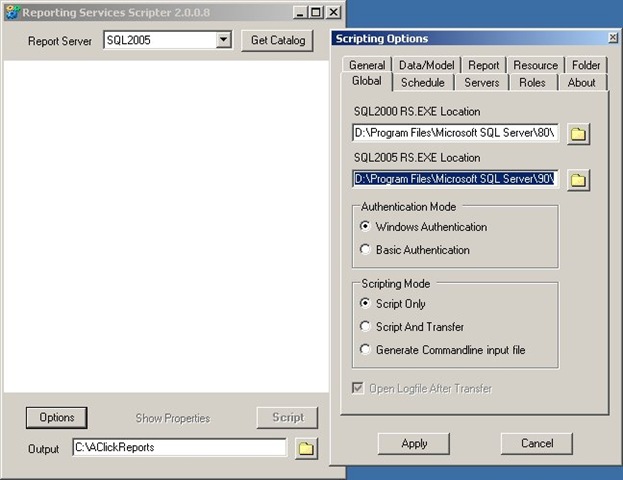
  5. Change the SQL 2005 RS EXE Location in the Global tab as per the location of SQL server and Apply – clip_image004
  6. Select SQL 2005 from the Report Server dropdown and click on Get Catalog, all the reports, data source, Schedules, Roles etc present in report server will be displayed –
    rs1
  7. Select all the reports, data source, schedules and roles you want to transfer.
    rs2
Change the output directory path (Should not be machine/user specific e.g. Desktop) e.g. C:\AClickReports and click on Script. The script for loading the specified items will be generated to the specified folder.

2. Deploying the Reports

  1. Ensure that you have IIS and dot net framework 2.0 is installed on report server.
  2. While installing SQL server 2005 select reporting services option.
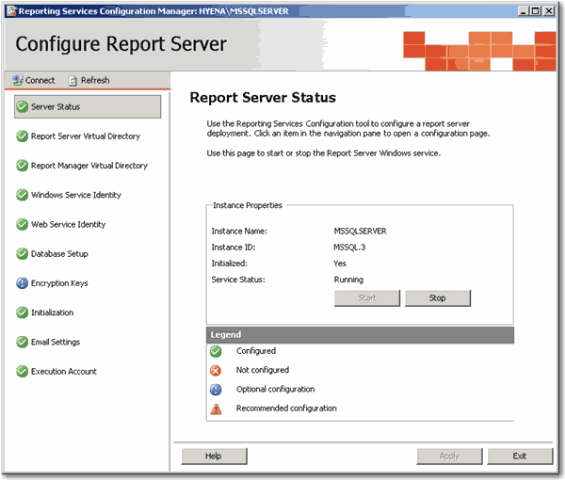
  3. Follow the report server configuration steps and make sure "Report Server Configuration Manager" is all green ticks? clip_image008
  4. Follow these steps to publish reports –
    1. Extract the AClickReports folder to the report server, C: Drive.
    2. Open the “RS Scripter Load All Items.cmd” file located in AClickReports folder for editing.
    3. Change the SCRIPTLOCATION Script variable value to the location where AClickReports folder is copied (Should be same to the output directory path selected in step 3.8)
        SET SCRIPTLOCATION=C:\ AClickReports\
      clip_image009
    4. Change the RS Script variable value to the location where Microsoft SQL Server is installed (if it is different from the default C drive).
      SET RS="C:\Program Files\Microsoft SQL Server\90\Tools\Bin\RS.EXE"
    5. Run the RS Scripter Load All Items.cmd batch file, it will publish the reports to the report server.
  5. Follow these steps to verify that reports are deployed correctly
    1. Go to http://localhost/Reports/Pages/Folder.aspx, clip_image011
    2. Open the Data Sources you should see data sources selected in step 1.7 clip_image013
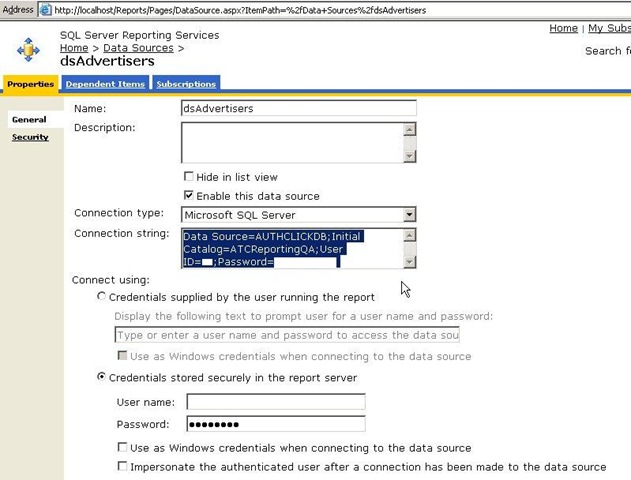
    3. Open the data source and update the data source details as per the configuration of report server(if they are different) and apply. rs3
    4. Go back to Home page and click on the report folder selected in step 1.7 , select one of the reports and click on Edit button, then click on the Data Sources link ; Make sure that the data source is configured properly. clip_image017
    5. Repeat the steps from 2.5.2 to 2.5.4 for other data sources and report folders.

统计数据库各个表所占空间的sql script

create table #t(name varchar(255), rows bigint, reserved varchar(20), data varchar(20), index_size varchar(20), unused varchar(20))
exec sp_MSforeachtable "insert into #t exec sp_spaceused '?'"
select * from #t
drop table #t

How to easily identify a scheduled SQL Server Reporting Services report

Problem
Our company has hundreds of SQL Server Reporting Services reports with daily, weekly, monthly, quarterly, yearly and adhoc schedules with various rendering formats like web archive, excel, pdf, csv, xml and tiff sent to multiple users, departments and groups. Sometimes we have to manually run a subscription to resend reports on an adhoc basis or re-send the reports when the actual subscriptions failed or when the data had to be corrected.
In this tip I will show you an easy way to identify the scheduled Reporting Services report, so you can run that scheduled job to reproduce the reports and delivery of the reports.
Solution
SQL Server Reporting services has come a long way from the first time it was released for SQL Server 2000 SP4. Unfortunately there are still some rough corners where it could be improved and one such place is subscriptions.
Manually initiating a subscription is a tedious task in SQL Server Reporting Services. Each subscription in Reporting Services is setup as a SQL Server Agent job, but the job names are NOT intuitive, rather named as a Unique Identifier as shown below.
Here is a screenshot of some of the subscriptions on a Reporting Services instance.
Fortunately, SQL Server Reporting Services comes with a rich set of meta-data that is stored in tables and for today's tip we will take advantage of these tables. There are two different methods to accomplish this task and both of them are outlined below.
Option 1:
This method looks at the dbo.ReportSchedule, dbo.Subscriptions, dbo.Catalog tables of the ReportServer database along with the dbo.sysjobs table of the msdb to figure out the SQL Agent job name. Additional information is also pulled to isolate the correct report when a similarly named report is in multiple folders/paths.
SELECT

            b.name AS JobName

            , e.name

            , e.path

            , d.description

            , a.SubscriptionID

            , laststatus

            , eventtype

            , LastRunTime

            , date_created

            , date_modified

    FROM ReportServer.dbo.ReportSchedule a JOIN msdb.dbo.sysjobs b

            ON a.ScheduleID = b.name

            JOIN ReportServer.dbo.ReportSchedule c

            ON b.name = c.ScheduleID

            JOIN ReportServer.dbo.Subscriptions d

            ON c.SubscriptionID = d.SubscriptionID

            JOIN ReportServer.dbo.Catalog e

            ON d.report_oid = e.itemid

    WHERE e.name = 'Sales_Report'
            
From the above resultset, grab the uniqueidentifier for the JobName column and filter the job in SSMS as shown below. Once the correct job is identified, run the SQL Server Agent job to deliver the subscription.

Option 2:
This option is better than the first option and completely eliminates the manual step in Option 1 of having to find and run the SQL Agent job.
In this option, we will generate the T-SQL that is used inside the SQL Agent job directly from the tables and then just run the SQL. It's a pure SQL based solution.
After you run this query, get the column that has the EXEC command for the report you want to re-run and paste the EXEC command into a query window to execute the code to re-run the report.
SELECT

    'EXEC ReportServer.dbo.AddEvent @EventType=''TimedSubscription'', @EventData=''' 
+ CAST(a.SubscriptionID AS VARCHAR(40)) + '''' AS ReportCommand

            , b.name AS JobName

            , a.SubscriptionID

            , e.name

            , e.path

            , d.description

            , laststatus

            , eventtype

            , LastRunTime

            , date_created

            , date_modified

    FROM ReportServer.dbo.ReportSchedule a JOIN msdb.dbo.sysjobs b

            ON a.ScheduleID = b.name

            JOIN ReportServer.dbo.ReportSchedule c

            ON b.name = c.ScheduleID

            JOIN ReportServer.dbo.Subscriptions d

            ON c.SubscriptionID = d.SubscriptionID

            JOIN ReportServer.dbo.Catalog e

            ON d.report_oid = e.itemid

    WHERE e.name = 'Sales_Report'
            

SQL Server script to rebuild all indexes for all tables and all databases

Problem

One of the main functions of a DBA is to maintain database indexes.  There have been several tips written about different commands to use for both index rebuilds and index defrags as well as the differences between index maintenance with SQL Server.  In addition, other tips have been written about using maintenance plans to maintain indexes on all databases.  One of the issues with maintenance plans is that they don't always seem to be as reliable as you would hope and you also sometimes get false feedback on whether the task actually was successful or not.  In this tip we look at a simple script that could be used to rebuild all indexes for all databases.

Solution

The one nice thing about maintenance plans is that it works across multiple databases and therefore you can push out one task to handle the same activity across all of your databases.  The problem that I have seen with maintenance plans is that sometimes they do not work as expected, therefore here is another approach.
The script below allows you to rebuild indexes for all databases and all tables within a database.  This could be further tweaked to handle only indexes that need maintenance as well as doing either index defrags or index rebuilds.
The script uses two cursors one for the databases and another for the tables within the database.  In addition, it uses the INFORMATION_SCHEMA.TABLES view to list all of the tables within a database. 
Because we need to change from database to database we also need to create dynamic SQL code for the queries.  For the DBCC DBREINDEX option we can just pass in the parameters, but for the ALTER INDEX statement we need to build the query dynamically.  Here is the script.
DECLARE @Database VARCHAR(255)   DECLARE @Table VARCHAR(255)  DECLARE @cmd NVARCHAR(500)  DECLARE @fillfactor INT

SET
@fillfactor = 90
DECLARE DatabaseCursor CURSOR FOR
SELECT
name FROM MASTER.dbo.sysdatabases   WHERE name NOT IN ('master','msdb','tempdb','model','distribution')   ORDER BY 1
OPEN DatabaseCursor
FETCH NEXT FROM DatabaseCursor INTO @Database  WHILE @@FETCH_STATUS = 0  BEGIN

   SET
@cmd = 'DECLARE TableCursor CURSOR FOR SELECT ''['' + table_catalog + ''].['' + table_schema + ''].['' +
  table_name + '']'' as tableName FROM '
+ @Database + '.INFORMATION_SCHEMA.TABLES
  WHERE table_type = ''BASE TABLE'''  

  
-- create table cursor
  
EXEC (@cmd)
  
OPEN TableCursor  

  
FETCH NEXT FROM TableCursor INTO @Table  
  
WHILE @@FETCH_STATUS = 0  
  
BEGIN  

       IF
(@@MICROSOFTVERSION / POWER(2, 24) >= 9)
      
BEGIN
          
-- SQL 2005 or higher command
          
SET @cmd = 'ALTER INDEX ALL ON ' + @Table + ' REBUILD WITH (FILLFACTOR = ' + CONVERT(VARCHAR(3),@fillfactor) + ')'
          
EXEC (@cmd)
      
END
       ELSE
       BEGIN
          
-- SQL 2000 command
          
DBCC DBREINDEX(@Table,' ',@fillfactor)
      
END

       FETCH
NEXT FROM TableCursor INTO @Table  
  
END  

   CLOSE
TableCursor  
  
DEALLOCATE TableCursor

  
FETCH NEXT FROM DatabaseCursor INTO @Database  END
CLOSE
DatabaseCursor   DEALLOCATE DatabaseCursor
The script will work for both SQL 2000 and higher versions.  For SQL 2000 it uses DBREINDEX and for SQL Server 2005 and higher it uses ALTER INDEX.  Thanks go out to LittlePanthers for providing the code snippet to check the version of SQL Server.
Also, I have excluded the system databases, so you can include these or also add other databases to exclude from you index maintenance routines.

Next Steps

  • This is a simple base script that could be modified into a stored procedure and also allow you to pass other parameters such as doing an index rebuild or an index defrag.
  • Make the index rebuild statements more robust with other options.
  • You could also modify this to read from a table that you create to identify which databases and which indexes you want to run this against.  You can look at index fragmentation and only rebuild the indexes that need to be rebuilt.
  • This approach rebuilds all indexes, so be careful if you run this on very large indexes.

Index Fragmentation Report in SQL Server 2005 and 2008

ProblemWhile indexes can speed up execution of queries several fold as they can make the querying process faster, there is overhead associated with them. They consume additional disk space and require additional time to update themselves whenever data is updated, deleted or appended in a table. Also when you perform any data modification operations (INSERT, UPDATE, or DELETE statements) index fragmentation may occur and the information in the index can get scattered in the database. Fragmented index data can cause SQL Server to perform unnecessary data reads and switching across different pages, so query performance against a heavily fragmented table can be very poor. In this article I am going to write about fragmentation and different queries to determine the level of fragmentation.
SolutionWhen indexes are first built, little or no fragmentation should exist. Over time, as data is inserted, updated, and deleted, fragmentation levels on the underlying indexes may begin to rise. So let's see how it happens.
When a page of data fills to 100 percent and more data must be added to it, a page split occurs. To make room for the new incoming data, SQL Server moves half of the data from the full page to a new page. The new page that is created is created after all the pages in the database. Therefore, instead of going right from one page to the next when looking for data, SQL Server has to go from one page to another page somewhere else in the database looking for the next page it needs. This is called index fragmentation.
There are basically two types of fragmentation:
  • External fragmentation - External, a.k.a logical,  fragmentation occurs when an index leaf page is not in logical order, in other words it occurs when the logical ordering of the index does not match the physical ordering of the index. This causes SQL Server to perform extra work to return ordered results. For the most part, external fragmentation isn’t too big of a deal for specific searches that return very few records or queries that return result sets that do not need to be ordered.
  • Internal fragmentation - Internal fragmentation occurs when there is too much free space in the index pages. Typically, some free space is desirable, especially when the index is created or rebuilt. You can specify the Fill Factor setting when the index is created or rebuilt to indicate a percentage of how full the index pages are when created. If the index pages are too fragmented, it will cause queries to take longer (because of the extra reads required to find the dataset) and cause your indexes to grow larger than necessary. If no space is available in the index data pages, data changes (primarily inserts) will cause page splits as discussed above, which also require additional system resources to perform.
As we learned, heavily fragmented indexes can degrade query performance significantly and cause the application accessing it to respond slowly. So now the question is how to identify the fragmentation. For that purpose SQL Server 2005 and 2008 provide a dynamic management function (DMF) to determine index fragmentation level. This new DMF (sys.dm_db_index_physical_stats) function accepts parameters such as the database, database table, and index for which you want to find fragmentation. There are several options that allow you to specify the level of detail that you want to see in regards to index fragmentation, we will see some of these options in the examples below.
The sys.dm_db_index_physical_stats function returns tabular data regarding one particular table or index.
Input Parameter Description
database_id The default is 0 (NULL, 0, and DEFAULT are equivalent values in this context) which specify to return information for all databases in the instance of SQL Server else specify the databaseID from sys.databases if you want information about a specific database. If you specify NULL for database_id, you must also specify NULL for object_id, index_id, and partition_number.
object_id The default is 0 (NULL, 0, and DEFAULT are equivalent values in this context) which specify to return information for all tables and views in the specified database or else you can specify object_id for a particular object. If you specify NULL for object_id, you must also specify NULL for index_id and partition_number.
index_id The default is -1 (NULL, -1, and DEFAULT are equivalent values in this context) which specify to return information for all indexes for a base table or view. If you specify NULL for index_id, you must also specify NULL for partition_number.
partition_number The default is 0 (NULL, 0, and DEFAULT are equivalent values in this context) which specify to return information for all partitions of the owning object. partition_number is 1-based. A nonpartitioned index or heap has partition_number set to 1.
mode mode specifies the scan level that is used to obtain statistics. Valid inputs are DEFAULT, NULL, LIMITED, SAMPLED, or DETAILED. The default (NULL) is LIMITED.
  • LIMITED - It is the fastest mode and scans the smallest number of pages. For an index, only the parent-level pages of the B-tree (that is, the pages above the leaf level) are scanned. In SQL Server 2008, only the associated PFS and IAM pages of a heap are examined; the data pages of the heap are not scanned. In SQL Server 2005, all pages of a heap are scanned in LIMITED mode.
  • SAMPLED - It returns statistics based on a 1 percent sample of all the pages in the index or heap. If the index or heap has fewer than 10,000 pages, DETAILED mode is used instead of SAMPLED.
  • DETAILED - It scans all pages and returns all statistics.
Note
  • The sys.dm_db_index_physical_stats dynamic management function replaces the DBCC SHOWCONTIG statement. It requires only an Intent-Shared (IS) table lock in comparison to DBCC SHOWCONTIG which required a Shared Lock, also the algorithm for calculating fragmentation is more precise than DBCC SHOWCONTIG and hence it gives a more accurate result.
  • For an index, one row is returned for each level of the B-tree in each partition (this is the reason, if you look at image below, for some indexes there are two or more than two records for a single index; you can refer to the Index_depth column which tells the number of index levels). For a heap, one row is returned for the IN_ROW_DATA allocation unit of each partition. For large object (LOB) data, one row is returned for the LOB_DATA allocation unit of each partition. If row-overflow data exists in the table, one row is returned for the ROW_OVERFLOW_DATA allocation unit in each partition.
Example
Let’s see an example. The first script provided below gives the fragmentation level of a given database including all tables and views in the database and all indexes on these objects. The second script gives the fragmentation level of a particular object in the given database. The details about the columns and its meaning returned by the sys.dm_db_index_physical_stats are given in the below table.
Script : Index Fragmentation Report Script
--To Find out fragmentation level of a given database
--This query will give DETAILED information
--CAUTION : It may take very long time, depending on the number of tables in the DB
USE AdventureWorks
GO
SELECT object_name(IPS.object_id) AS [TableName], 
   SI.name AS [IndexName], 
   IPS.Index_type_desc, 
   IPS.avg_fragmentation_in_percent, 
   IPS.avg_fragment_size_in_pages, 
   IPS.avg_page_space_used_in_percent, 
   IPS.record_count, 
   IPS.ghost_record_count,
   IPS.fragment_count, 
   IPS.avg_fragment_size_in_pages
FROM sys.dm_db_index_physical_stats(db_id(N'AdventureWorks'), NULL, NULL, NULL , 'DETAILED') IPS
   JOIN sys.tables ST WITH (nolock) ON IPS.object_id = ST.object_id
   JOIN sys.indexes SI WITH (nolock) ON IPS.object_id = SI.object_id AND IPS.index_id = SI.index_id
WHERE ST.is_ms_shipped = 0
ORDER BY 1,5
GO
--To Find out fragmentation level of a given database and table
--This query will give DETAILED information
DECLARE @db_id SMALLINT;
DECLARE @object_id INT;
SET @db_id = DB_ID(N'AdventureWorks');
SET @object_id = OBJECT_ID(N'Production.BillOfMaterials');
IF @object_id IS NULL 
BEGIN
   PRINT N'Invalid object';
END
ELSE
BEGIN
   SELECT IPS.Index_type_desc, 
      IPS.avg_fragmentation_in_percent, 
      IPS.avg_fragment_size_in_pages, 
      IPS.avg_page_space_used_in_percent, 
      IPS.record_count, 
      IPS.ghost_record_count,
      IPS.fragment_count, 
      IPS.avg_fragment_size_in_pages
   FROM sys.dm_db_index_physical_stats(@db_id, @object_id, NULL, NULL , 'DETAILED') AS IPS;
END
GO

Returned Column Description
avg_fragmentation_in_percent It indicates the amount of external fragmentation you have for the given objects. The lower the number the better - as this number approaches 100% the more pages you have in the given index that are not properly ordered.
For heaps, this value is actually the percentage of extent fragmentation and not external fragmentation.
avg_page_space_used_in_percent It indicates how dense the pages in your index are, i.e. on average how full each page in the index is (internal fragmentation). The higher the number the better speaking in terms of fragmentation and read-performance. To achieve optimal disk space use, this value should be close to 100% for an index that will not have many random inserts. However, an index that has many random inserts and has very full pages will have an increased number of page splits. This causes more fragmentation. Therefore, in order to reduce page splits, the value should be less than 100 percent.
fragment_count A fragment is made up of physically consecutive leaf pages in the same file for an allocation unit. An index has at least one fragment. The maximum fragments an index can have are equal to the number of pages in the leaf level of the index. So the less fragments the more data is stored consecutively.
avg_fragment_size_in_pages Larger fragments mean that less disk I/O is required to read the same number of pages. Therefore, the larger the avg_fragment_size_in_pages value, the better the range scan performance.

Wednesday, July 13, 2011

VMware vSphere 4.1虚拟化学习手册1:VMware vSphere简介(ZT)

什么是VMware vSphere
vSphere是VMware推出的基于云的新一代数据中心虚拟化套件,提供了虚拟化基础架构、高可用性、集中管理、监控等一整套解决方案
VMware vSphere 4套件组成
ESX/ESXi:物理服务器的虚拟化层,它将处理器、内存、存储器和资源虚拟化(交换机)为多个虚拟机,是vSphere服务器虚拟化基础架构组件;
vCenter:用于集中管理ESX/ESXi及其上的虚拟机,可通过其配置ESX/ESXi Cluster,实现HA、DRS、VMotion等高可用性功能;通过扩展vCenter相关插件,可实现更多高级功能;4.1以后只能装在64位os上。
vSphere Client:vSphere 管理客户端,用于直接连接ESX/ESXi主机实现基本管理任务,或通过连接vCenter实现ESX/ESXi和VM的集中管理;
Vmware vSphere Web Access:web管理界面,可以通过浏览器对Vmware vSphere或Vcenter进行管理。
vConverter:虚拟机迁移工具,可实现物理机到虚拟机的迁移(P2V),以及不同厂商虚拟机文件或镜像间的转换(V2V);分为以下三个版本:
  • vCenter Converter Enterprise:vCenter集成版本,安装后集成在vCenter管理界面中,此版本还包括一个用于冷迁移的CD启动版;
  • vCenter Converter Standalone:免费版本;
VCB:虚拟机备份命令行工具,可实现在线或离线虚拟机的自动备份;
Vmware VMFS:vmwae的文件系统,类似Windows的ntfs或linux的ext2和ext3。
VMware vmotion:一台vm从一个物理esx迁移到另一台物理esx上。
Vmware HA(高可用性):虚拟机的高可用,就是双机互备,跟普通的HA理念双互备差不多。
Vmware DRS.:在一个大的资源池分配给每一台vm的资源智能调优。
Vmware FT:多台esx.提供资源跑一个vm。
DataRecovery:虚拟机备份、恢复图形化工具;
Update Manager:用于ESX/ESXi主机及虚拟机的升级和补丁管理;可分为以下俩个版本:
  • vCenter Update Manager:vCenter集成版本,可在vCenter服务器上选择安装,安装后集成在vCenter管理界面中;
  • vSphere Host Update Utility:可在安装vSphere Client时选择安装,免费版本,用于单主机升级;
vCenter Guided Consolidation:在把现有的应用服务器整合到虚拟机之前,对其进行在线分析,以确认其资源使用情况,并给出整合建议,可在vCenter服务器上选择安装,安装后集成在vCenter管理界面中;
vCenter Orchestrator:vSphere工作流引擎,通过其可进行虚拟化相关的工作流设计,以实现虚拟化环境管理的自动化,此组件随vCenter自动安装;

vSphere4架构图
Vmware vmotion对inter 兼容列表
Vmware vmotion对amd 兼容列表
Vmware vmotion 对intel/amd cpu兼容列表
vSphere 4版本比较:
 
参考网址:
VMware vSphere (ESX)各版本比较:
http://www.vmware.com/cn/products/vsphere/buy/editions_comparison.html
VMware vSphere Hypervisor (ESXi)与其他虚拟化软件比较:
http://www.vmware.com/cn/products/vsphere-hypervisor/compare.html
如何下载并使用免费版本:
去VMware网站注册一个账户,申请一个免费的ESXi授权,然后下载ESXi或ESX进行安装;
注册下载页面:
https://www.vmware.com/cn/tryvmware/index.php?p=free-esxi&lp=1
使用vSphere Client连接安装好的ESX/ESXi,输入免费授权CDKey,之后就可在其上建立并运行虚拟机;
免费版本因为无vCenter可用,所以只能使用vSphere Client进行单机管理,可免费使用的功能组件仅限于以下两个:vCenter Converter Standalone和vSphere Host Update Utility
默认在不输入授权CDKey的情况下,可在60天内免费试用vSphere 4 Enterprise Plus;
关于ESX和ESXi
很多人都有一个误解,认为“ESX是全功能的收费版本,ESXi是个缩减功能的免费版”,这是错误的;下面我大概解释一下:
ESX和ESXi的唯一区别是“ESX带有一个基于Linux的Service Console,而ESXi则无此控制台”;
除去以上一点,其他功能两者没什么区别,具体可使用的功能取决于您使用的License类型,比如:Enterprise Plus License可授权使用vSphere4的所有功能,不管是ESX还是ESXi;
那可以免费使用ESX吗?当然可以!只要在安装好的ESX上输入免费ESXi License即可,两者的License是通用的;

source :http://www.liusuping.com/xunihua/VMware-vSphere-jianjie.html

虽然很黄,但很现实(zt)


1、赵四小姐从十六岁开始跟张学良。跟一年,属奸情;跟三年,算偷情;跟六十年,
便成为千古爱情!
此事的重要启示:很多事情不看做不做,而看你做多久。

2、民国初名妓小凤仙,如果跟了民工,就属于扫黄对象;她跟了蔡锷,则千古留芳了
;倘若她跟了孙中山,那便可能成为国母。
此事的重要启示:不在于你干什么,而看你跟谁干。

3、女浴室起火,里面人乱作一团,赤裸身体往外跑,只见大街上白花花一大群,一老
者大喊“快捂住”,众裸女突然醒悟,但身上要紧部位有三处,手忙脚乱捂不过来,不
知所措。这时老者又大喊:“捂脸就行,下面都一样!”
此事的重要启示:在特殊情况下抓工作不可能面面俱到,要抓住重点。


4、少妇报案:“我把钱放在胸衣内,在拥挤的地铁内被一帅哥偷走了…”警察纳闷:
“这么敏感的地方你就没觉察到?”少妇红着脸答:“谁能想到他是摸钱呢?”
此事的重要启示:“让客户的钱在愉快体验中不知不觉地被摸走,是商业模式的最高境界

5、组织几个人收保护费,那是黑社会。朱元障组织几百万人抢下王位,就是伟大的皇
帝。武则天睡了公公睡儿子,虽属乱伦,但乱的够大,故成为女皇。
此事的重要启示:不在你干没干坏事,而在于干多大!
6、一公司在小便池上贴上条:“往前一小步, 文明一大步”,结果地上仍有许多尿渍
。后来公司认真吸取教训, 重新设计成:“尿不到池里说明你短;尿到池外说明你软”
,结果地上比以前干净许多。
此事的重要启示:给客户的投资建议一定要具体,确切,中要害.

7、某日,女秘书神色凝重地说:王总,我怀孕了。 王继续低头看文件,然后淡淡一笑:我
早结扎了。 女秘书楞了一会媚笑道:我和您开玩笑呢! 王抬起头看了她一眼,喝了口茶
说:我也是。
此事的重要启示:在江湖上混的人,遇事不要慌,先让子弹飞一会。

8、男子去提亲,女方家长:请自我介绍。
A说:我有一千万;
B说:我有一栋豪宅,价值两千万;
家长很满意。就问C,你家有什么?
C答:我什么都没有,只有一个孩子,在你女儿肚子里。
AB无语,走了。
此事的重要启示:核心竞争力不是钱和房子,是在关键的岗位有自已的人。
9、[中~央~党~校教学案例]一男干部怕吃苦不愿援藏,谎称眼睛突然失明。领导闻听
,出面让一美女脱光站在他面前,问“看见了吗”?答:看不见。领导飞起一脚给他臀
部:狗日的,老二都直了还看不见?收拾行李,明天进藏。
此事的重要启示:1.人性化才能真正了解人。2.组织比个人高明。3.本能会出卖你
10, 广东一伙劫匪在抢劫银行时说了一句至理名言: “通通不许动,钱是国家的,命是自
己的!”大家都一声不吭躺倒。劫匪望了一眼躺在桌上四肢朝天的出纳小姐,说:“请
你躺文明些!这是劫财,又不是劫色!”劫匪回去后,其中一个新来的硕士劫匪说,老
大,我们赶快数一下抢了多少,那老劫匪(小学文化)说:“你傻啊?这么多,你要数
到什么时候啊?今天晚上看新闻不就知道了吗。” ----这就叫工作经验,这年头工作
经验比学历更重要! 劫匪走后,行长说,赶紧报案!主任刚要走,行长说急忙说:“
等等!把我们上次私自挪用的那五百万也加上去!”主任说:“要是劫匪每个月都来抢
一回就好了”。