Tuesday, June 4, 2013
如果解决Hybrid开发中的白屏问题
这两天有人在邮件和微博上问我,混合(Hybrid)开发如何解决白屏的问题,本来我是计划要写一写Hybrid开发的各种问题,但看来文章可能会太长,所以还是先谈谈白屏的问题吧。我觉得Android如果使用到Hybrid技术的,也是可以借鉴的,解决思路是一样的。
我们通常把移动开发分为Web、Native和Hybrid,但其实Hybrid又可以细分的。最简单的是在Native中放一个WebView, 然后加载一个兼容智能机的网站,其实就相当于在用户的手机上建立一个快捷方式,也算是占据用户桌面的应急用法吧。用这种方法要注意检测网络是否正常,不正 常要给予提示,否则苹果是不予通过的。第二种是将Web相关文件全部放在本地,数据库一般用Sqlite做本地存储,用户就算不联网也能工作。第三种可能 是以Native为主,在某些特定的模块才会用到WebView。
其实要我说,只有第二种才算是真正的Hybrid,话说Hybrid这个词可真难听,翻译过来的词是杂种、杂交,既然大家都这么用,我也就随了吧。 很重要的一点是Native和Web有没有交互,没有的不算,你直接在WebView中加载一个HTML页面,这算哪门子的Hybrid开发,这种也谈不 上什么技术含量了,没什么好讲的。你这种开发很难模拟Native的体验嘛,用户一看就不对啊,我说的Hybrid开发是那种多数用户看不出差别的。
之所以我要把Hybrid开发的种类讲清楚,是因为它们遇到的白屏问题有所不同,有些白屏问题是可以通过技术解决的,有些是需要通过设计上去解决的,通常我们说的白屏有三种。
第一种是页面切换带来的白屏,就是你从index.html跳转到product.html会出现的白屏,嵌个WebView就加载一个网站最容易 出现这种问题。这个问题只能从设计上解决,技术上是无法解决的,或者解决起来比开发一个Native程序成本还高。正确的做法应该是避免页面之间的跳转, 将所有的内容放入到一个HTML中,通过CSS的Display属性来切换View。
第二种是因为页面过长带来的白屏,在iOS的WebView中,如果页面内容过长,iOS是不会一次渲染完成的,所以太长的时候,就会产生一种像 Phtoshop中那种透明背景的方格效果。这个问题最好的解决方法还是从设计上入手,避免这种过长的滚动。使用iScroll做滚动可以解决部分问题, 但还是不能太长。
第三种白屏是启动的时候有讨厌的白屏,因为WebView加载HTML并渲染有一定的时间,用户一打开你的App,WebView还没有加载并渲染 完比,白屏出现了。这种情况解决要用一些技巧,iOS可以用两个View,一个View放上Loading画面,另一个View加载HTML,当HTML 加载完毕后,用Javascript通知Native,收到HTML加载完比后Native代码负责切换View即可。
有人肯定要问,为什么不直接用Objective-c代码写WebView的onLoad事件?很简单,因为Load完成可能还有很多事要做,而且 一般要延时300毫秒再切换View才能保证白屏不出现。你可能要再问了,直接用延时不好么,为什么要这么麻烦?不同的机器性能不一,而且有些时候内存占 得多加载可能就慢点,直接延时太死。

Sunday, June 2, 2013
怎么选高尔夫球 -How To Buy Golf Balls
Today's golf balls are the culmination of a variety of disciplines and talents, from material science to
physics. Since there are many kinds of golfers, engineers have devised many kinds of golf balls. When matched
correctly to a golfer's game, specific golf balls can increase enjoyment as well as chances for par. The
technology of golf balls has reached an unprecedented level, offering different covers, cores, dimple patterns
and compression to best suit golfers' varying needs.
- Ball Types
- Construction
- Playing Level
Distance
- A ball designed to react quickly off the clubface for maximum speed, which results in overall distance.
- Distance balls appeal to people who find every yard counts, but where it may bring 15 more yards off the tee, it might also skip off the putting surface like a flat rock on water.
Control
- A ball designed to deter excessive spin, such as backspin (makes the ball climb higher) or sidespin (hooks and slices).
- Control balls help golfers fight hooking-and-slicing tendencies and maneuver low shots on windy days.
Spin
- A ball intended to create as much backspin as possible, which generally leads to higher trajectory and better stopping ability on the ground.
- Better amateurs and touring pros prefer balls that offer high spin. These models may not be as long off the tee, but they make up for it in superior control.
Overall Design
Two-piece balls:
- Contain a large solid core and thin Surlyn cover
- Enhance distance and durability
- Offer more durability and improved playing characteristics
Three-piece balls:
- Contain a small solid or liquid core
- Usually have rubber windings, and cover elastic winding and soft balata cover
- Enhance backspin and control
Other:
- Multi-layers provide a multi-purpose ball
- Wound balls are made of thin, little rubber bands wound tightly into a sphere
Core
- Solid cores are usually made of a high-energy rubber or similar compound
- Liquid-filled cores offer less trajectory and great feel and can spin for better accuracy
- Titanium cores provide more reaction and greater distance
Cover
- Determines feel on soft hits, like putts and chips
- Blends co-polymer plastics, high-energy rubber, or similar resistant compounds
- Multi-cover layers material over the core to induce different playing responses
- Surlyn balls travel farther with less spin
- Balata-covered balls are softer and offer more enhanced feel, although they don't resist scrapes and cuts well
Dimples
- Vary between 300 and 500
- Affects the aerodynamics for more or less trajectory
- Larger dimples promote trajectory
- Smaller dimples lessen trajectory
Compression
- Sorts golf balls by their hardness
- If you prefer a softer feel, you should play a 90 compression ball, and if you prefer a harder feel, you should play 100
- Swing speed is not necessarily the determining factor in selecting your compression
- When thinking about which ball will help you achieve par, it's best to imagine a good-sized par-4.
- If getting an extra 15 yards off the tee would help you hit shorter irons on approach shots to green, then maybe a distance ball will help.
- Most people feel that high-spin balls appeal only to pros that need precision on iron shots. But a senior or woman who has trouble reaching a par-4 in two shots will appreciate the control offered by a performance ball after the 3rd shot.
- Some balls are designed for slower swing speeds with a lightweight construction that catches air. They are generally marketed for women or seniors, but don't let labels fool you. Plenty of men play these balls because, for them, it yields the most distance.
Android的优化
1. 系统速度逐渐变慢

当你购买了一款配置不俗的全新Android手机,一开始会觉得系统运行速度很流畅,但是随着时间的推移,系统会变得越来越慢。你无需坐以待毙,也不用更换手机,只要下载安装一些支持自动定时清理的应用软件,比如"360"解决这个问题。
2. 无休止的通知提醒

Android系统的通知总是在不停地发出通知内容? 你可以尝试在通知设置中手动关闭一些内容,但是无论关闭多少,总是会有新的服务通知蹦出来。所以,最有效的解决方法不是逐个手动关闭通知,而是选择一个无声的音频文件作为默认声音。
3. 无法摆脱的预装垃圾软件
大多数Android设备都预装了一些厂商自家服务或是运营商的定制服务,有些或许是精品,但大部分其实都是一些垃圾软件,你可能从来不会去使用它们。同时一些内置应用无法卸载,并且在开机时自动驻留RAM中,影响整体性能。所以,你可以做的是在设置菜单中禁用这些应用。或者"360 mobile"等软件卸载
4. 电池寿命较短

残酷的现实是,如果你用一款Android手机进行以上操作,往往坚持不了一整天就需要充电。如果你愿意做出一些取舍,可以通过降低屏幕亮度、禁用背景数据和关闭GPS等操作,来延长电池寿命,而无需购买额外的电池或便携式充电器。如果不担心保修问题,你还可以通过Semaphore内核设置来降低手机的电压,来获得更长的续航能力。
5. 更精准的电量显示功能

大多数Android手机都没有提供精准的电量显示功能,所以你无法判断精准的剩余电量,从而控制使用强度。如果手机厂商没有为其配备电池百分比功能,你还可以通过下载第三方应用程序来实现这个功能。
6. 界面效果更美观

也许不喜欢它的界面效果,还可以通过安装第三方界面应用来进行美化。Android领域的第三方界面软件十分丰富,比如GO桌面EX、国内MIUI等等,基本上都配备了个性化的主题,甚至是自定义的手势功能,一些界面软件的运行速度甚至要比原生更为流畅。
7. 获得其他Android手机的独家功能

有时候你可能会羡慕其他Android手机内置的一些独家功能,比如LG Optimus G Pro的QSLIDE多任务窗口、Galaxy S4的画中画视频播放或是Droid RAZR的智能操作自动化服务等,其实你完全可以使用第三方应用来实现这些功能。比如在谷歌商店中搜索“浮动应用程序”,就可以找到“漂浮浏览器(Floating Browser Flux)”或是“超级视频(Super Video)”播放器,能够实现一定程度上的多任务操作功能;另外,类似“Tasker”这样的系统应用,只要设定一些条件,就可以实现手机自动化操作的功能。
8. “分享”菜单有太多选项

Android的最佳功能之一是其丰富的分享菜单功能,几乎列出了所有的可用内容,不过随着程序安装的增多,你会发现一些根本用不到的选项,看起来十分碍眼。第三方应用程序“Andmade share”可以帮助你解决这个困扰,它可以重新自定义分享菜单,删除不必要的选项,并根据自己的需求进行重新排列。
9. 解锁界面太复杂

一些智能手机厂商开始在解锁界面上添加更多的内容,比如显示天气、最常用的应用程序甚至了社交应用的更新内容,但如果你只需要一个简单迅速的解锁界面,可以进入系统设置中更改解锁屏幕的显示信息。
10. 错误的系统默认应用

有时候你想打开Android手机中的一个文件,但却发现并不是你最希望使用的软件,这可能是一些应用程序更改了默认的打开方式。与Windows系统一样,你也可以自行设置系统打开相关文件的默认应用,只需要进入应用程序设置栏目中,清除应用程序的预设值,再次打开相同的文件时,系统就会弹出选项,让你选择默认应用,可以根据需求选择“始终”或是“仅一次”的操作形式。
11. 默认输入法太难用

通常情况下,Android手机的系统内置输入法都很糟糕,很难获得良好的使用体验。事实上我们依然可以通过下载第三方应用来改变这个情况,在谷歌应用商店中,可以找到一票类似的软件,比如QQ输入法,拥有更好的手机键盘效果,也可自定义皮肤,更加符合国人的使用习惯。
12. 过时的Android系统版本

目前Android系统的最新版本是4.2果冻豆,但可能你的手机还是Android 4.0冰淇淋三明治、甚至是更过时的2.3版本。换句话说,你会错过一些最新的功能,比如谷歌语音助手、详细的通知内容以及所有适配新系统的应用程序。那么,除了祈祷手机厂商会在某一天内放出新版固件,你也可以尝试自行刷机。不过,刷机过程相对复杂一些,有可能会将设备刷成砖头,并且丧失保修服务。你可以参考一下XDA等专业论坛,一些ROM爱好者提供了相当丰富的自定义固件,并且附有详细的刷机条件和说明,只要按照步骤正确操作即可。对于已经ROOT过的机型,不仅可以刷自定义固件,甚至还可以超频,获得更流畅的使用体验。
Saturday, May 18, 2013
zz-To Solve the Connected/Standby Problem with the Win 8 Battery Report
source: http://www.umpcportal.com/2013/02/connected-standby-battery-life-problem/#more-26601
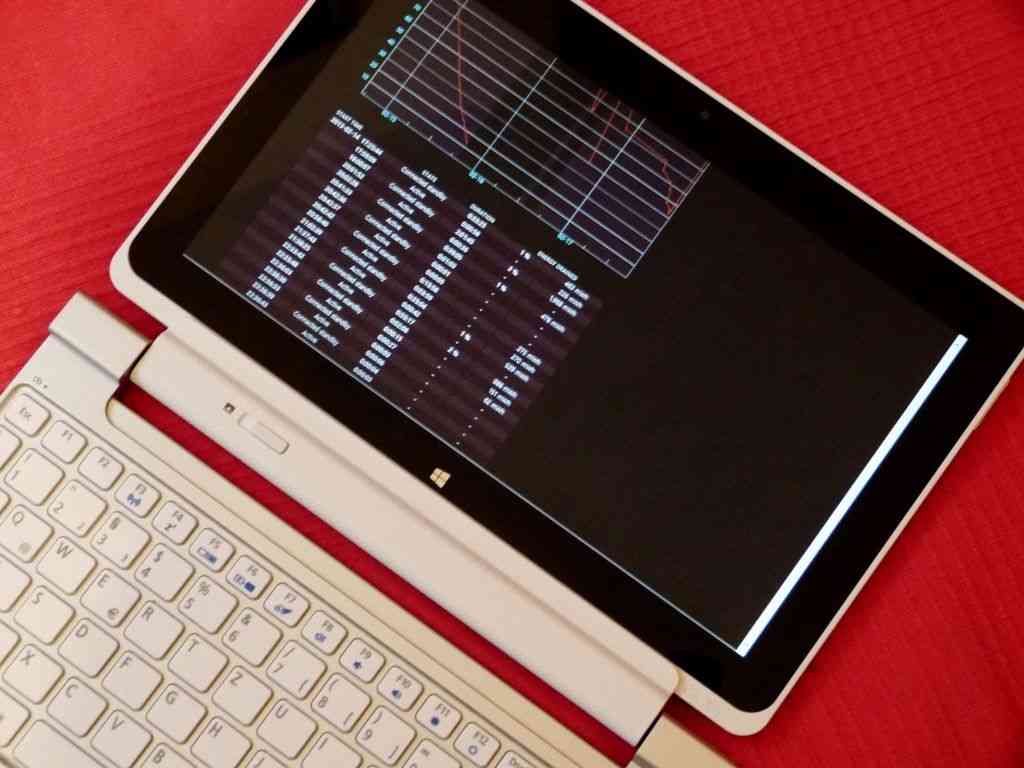
As I wrote about driver update V2.04 for the Acer W510 I noticed a few user reports of poor connected standby battery life. The following day I heard about V2.08. I updated again but I was seeing some serious Connected Standby issues. Battery life was way below what it should have been.
Here’s some information about how you can access a very cool battery life report on Windows 8, check your CS figures and potentially fix your problem. I hope you take the time to contribute your report or thoughts in the comments below too.
Powercfg battery life report on Windows 8
Here’s how to get a battery life report on any Windows 8 device.Hit the windows button to get to the start screen / modern UI and type cmd
At the prompt type:
powercfg -batteryreport
You’ll get a response within 5 seconds that a file has been created. Open that file with a browser and enjoy the stats. At the bottom you’ll find the average figure for your Windows 8 PC.
Example Powercfg battery report
Here’s my full report from the W510. Look at this snapshot below. The annotated green section shows in-spec CS drain figures. The red area shows out-of-spec CS figures. These results started after I installed V2.04 on the 2nd Feb. I installed V2.08 on 14th Feb.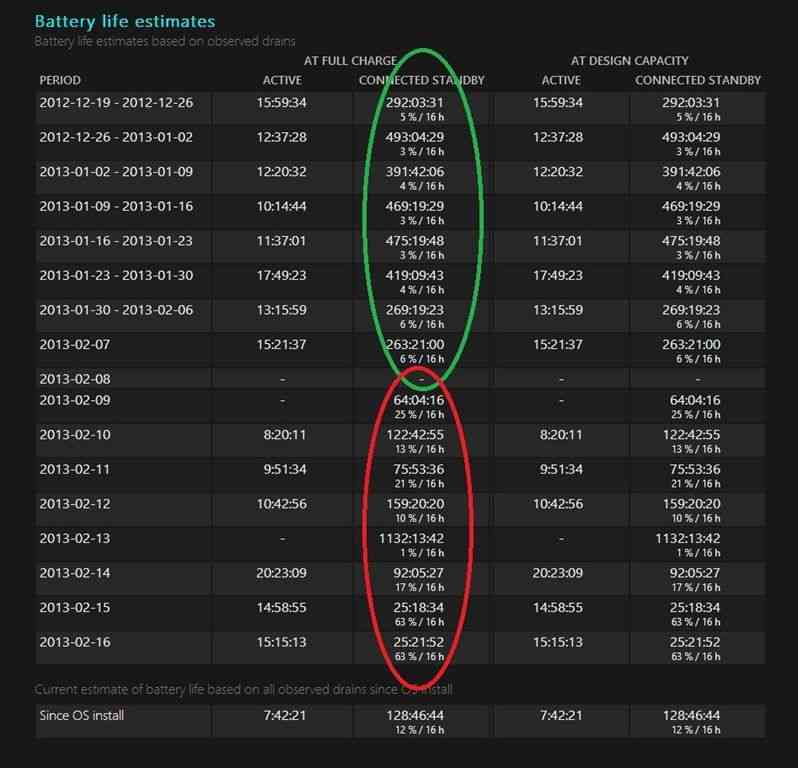
Look at the useful summary in the last section of the report. I’ve highlighted good and bad CS figures.
On the left you can see real-world in-use figures too. Yup, I’m regularly seeing over 10hrs n the W510 with the dual-battery.
For comparison, my Z830 Ultrabook returns 3hrs 51 average now which would be 4:28 with a new battery.
My ‘Fix’ and Other Notes
After some testing it’s appears that it’s WiFi that’s drainging the battery although the cause of the problem could be elsewhere – a process preventing the WiFi from going into sleep, for example. I don’t think it’s drivers because after what could have been a simple reboot yesterday, the device used just 2% off battery in an 11hr CS period last night. I’ll have to wait 24-48hrs to see if the problem is ‘fixed.’The interesting thing is that all the Clovertrail tablets I have used have almost the same hardware build and are likely to be using the same drivers. There’s a chance that problem goes beyond just the Acer W510. It’s time to get some crowdsourced information from you so we can get to the bottom of this.
Post your Powercfg Reports
Please run the powercfg command above and post a link to a snapshot of your results in the last section of the report. Alternatively, just post the last line of the report – the summary – and include the device name and measurement period.Are your battery reports for CS within spec?
- Under 5% per 16 hours with no background tasks
- My W510 was reporting 4-6% / 16h with background tasks
- Up to 10% / 16h would seem to be acceptable
- Constant radio streaming could take this up to around 15% / 16 h
- Over 15% drain per 16 hours could be regarded as suspicious but I’ll update this as we see results from users below.
If you think you’ve got a connected standby problem…
If you think you’ve got a problem here’s a few things you can try.- run powercfg /energy as administrator. You’ll get a report with issues highlighted.
-
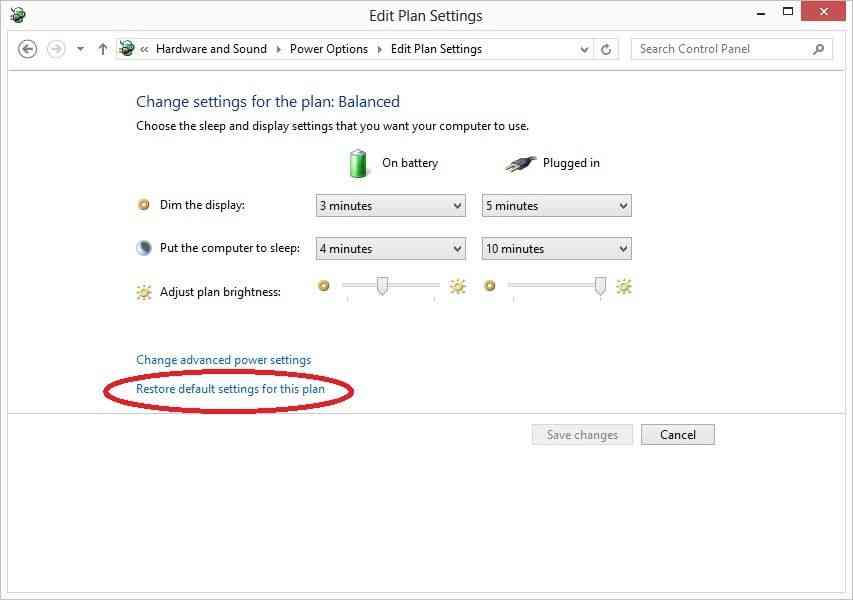
Make sure you reset your battery power profile to default settings.
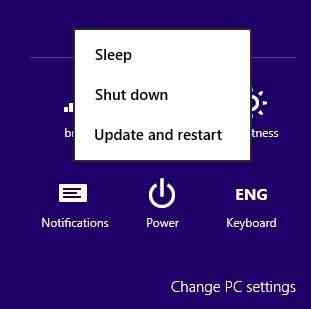
- Make sure your PC is not waiting for a Windows update reboot. This
could be preventing some standby features. “Update and Restart” via the
settings charm –> power button.
Connected Standby is an amazing feature but when it doesn’t work as expected it could catch you by surprise. I do expect laptop batteries to drain a lot if I leave the device running overnight but I don’t expect to wake up to a dead Acer W510. Keep an eye on your battery performance by regularly running the powercfg battery report.
For more info on measuring battery usage, see this good article by Intel – must read for all Win 8 developers in my opinion.
Monday, April 29, 2013
Monday, April 1, 2013
Wednesday, March 27, 2013
Sql script to drop all constraints on a table
-- t-sql script let to drop all constraints on a table
DECLARE @database nvarchar(50)
DECLARE @table nvarchar(50)
declare @i int
set @i=1
while @i<46 br="">begin
SELECT @database = DB_NAME()
set @table = 'dnt_posts'+ convert(varchar(2),@i)
DECLARE @sql nvarchar(255)
WHILE EXISTS(SELECT OBJECT_NAME(OBJECT_ID) AS CONSTRAINT_NAME FROM sys.objects WHERE type_desc LIKE 'DEFAULT_CONSTRAINT' AND OBJECT_NAME(parent_object_id) = @table)
BEGIN
SELECT @sql = 'ALTER TABLE ' + @table + ' DROP CONSTRAINT ' + OBJECT_NAME(OBJECT_ID)
FROM sys.objects WHERE type_desc LIKE 'DEFAULT_CONSTRAINT' AND OBJECT_NAME(parent_object_id) = @table
exec sp_executesql @sql
END
set @i=@i+1
end
Go
DECLARE @database nvarchar(50)
DECLARE @table nvarchar(50)
declare @i int
set @i=1
while @i<46 br="">begin
SELECT @database = DB_NAME()
set @table = 'dnt_posts'+ convert(varchar(2),@i)
DECLARE @sql nvarchar(255)
WHILE EXISTS(SELECT OBJECT_NAME(OBJECT_ID) AS CONSTRAINT_NAME FROM sys.objects WHERE type_desc LIKE 'DEFAULT_CONSTRAINT' AND OBJECT_NAME(parent_object_id) = @table)
BEGIN
SELECT @sql = 'ALTER TABLE ' + @table + ' DROP CONSTRAINT ' + OBJECT_NAME(OBJECT_ID)
FROM sys.objects WHERE type_desc LIKE 'DEFAULT_CONSTRAINT' AND OBJECT_NAME(parent_object_id) = @table
exec sp_executesql @sql
END
set @i=@i+1
end
Go
Subscribe to:
Posts (Atom)