Saturday, May 18, 2013

zz-To Solve the Connected/Standby Problem with the Win 8 Battery Report


source: http://www.umpcportal.com/2013/02/connected-standby-battery-life-problem/#more-26601
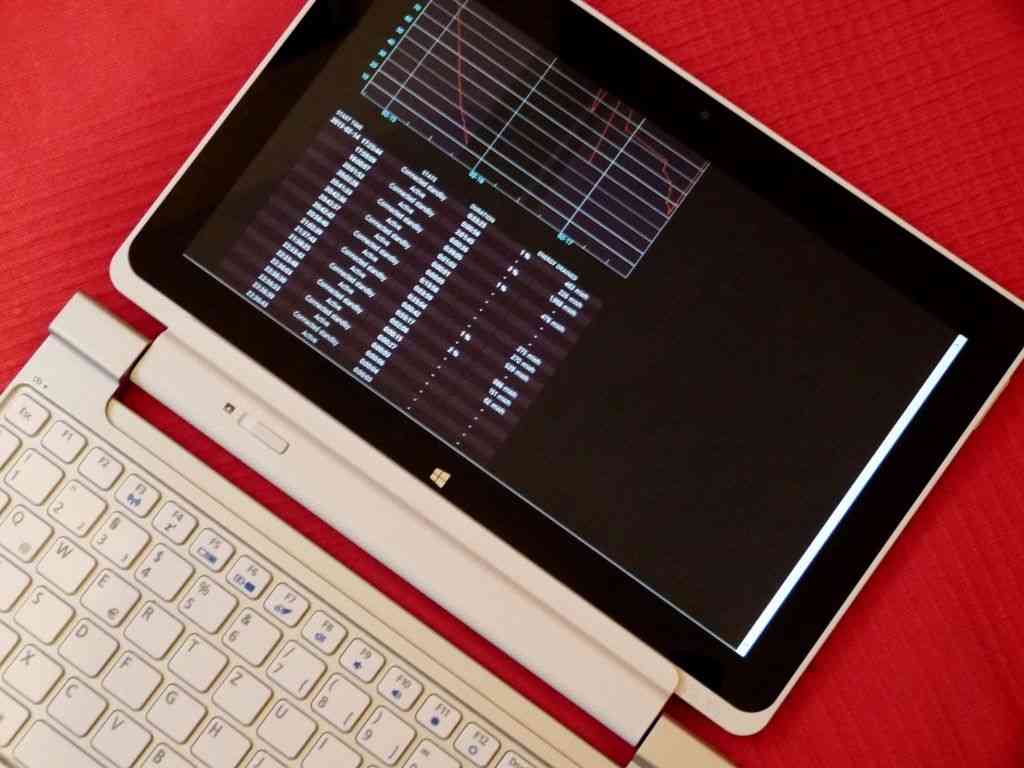
P1130878
As I wrote about driver update V2.04 for the Acer W510 I noticed a few user reports of poor connected standby battery life. The following day I heard about V2.08. I updated again but I was seeing some serious Connected Standby issues. Battery life was way below what it should have been.
Here’s some information about how you can access a very cool battery life report on Windows 8, check your CS figures and potentially fix your problem. I hope you take the time to contribute your report or thoughts in the comments below too.

Powercfg battery life report on Windows 8

Here’s how to get a battery life report on any Windows 8 device.
Hit the windows button to get to the start screen / modern UI and type cmd
At the prompt type:

powercfg -batteryreport
You’ll get a response within 5 seconds that a file has been created. Open that file with a browser and enjoy the stats. At the bottom you’ll find the average figure for your Windows 8 PC.

Example Powercfg battery report

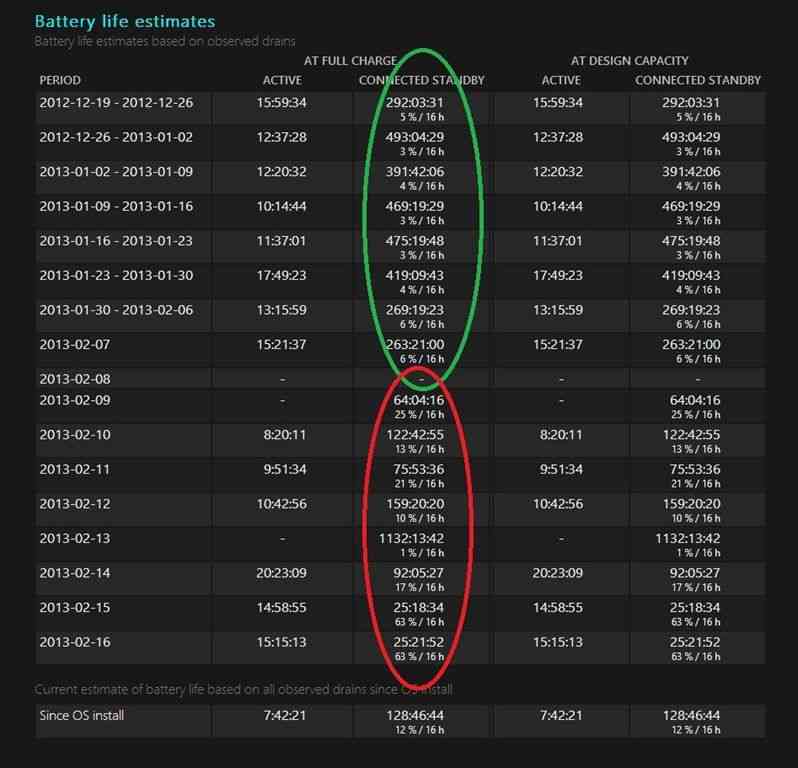
Here’s my full report from the W510.  Look at this snapshot below. The annotated green section shows in-spec CS drain figures. The red area shows out-of-spec CS figures. These results started after I installed V2.04 on the 2nd Feb.  I installed V2.08 on 14th Feb.
batteryreport-w510
Look at the useful summary in the last section of the report. I’ve highlighted good and bad CS figures.
On the left you can see real-world in-use figures too. Yup, I’m regularly seeing over 10hrs n the W510 with the dual-battery.
For comparison, my Z830 Ultrabook returns 3hrs 51 average now which would be 4:28 with a new battery.

My ‘Fix’ and Other Notes

After some testing it’s appears that it’s WiFi that’s drainging the battery although the cause of the problem could be elsewhere – a process preventing the WiFi from going into sleep, for example. I don’t think it’s drivers because after what could have been a simple reboot yesterday, the device used just 2% off battery in an 11hr CS period last night. I’ll have to wait 24-48hrs to see if the problem is ‘fixed.’
The interesting thing is that all the Clovertrail tablets I have used have almost the same hardware build and are likely to be using the same drivers. There’s a chance that problem goes beyond just the Acer W510. It’s time to get some crowdsourced information from you so we can get to the bottom of this.

Post your Powercfg Reports

Please run the powercfg command above and post a link to a snapshot of your results in the last section of the report. Alternatively, just post the last line of the report – the summary – and include the device name and measurement period.
Are your battery reports for CS within spec?
  • Under 5% per 16 hours with no background tasks
  • My W510 was reporting 4-6% / 16h  with background tasks
  • Up to 10% / 16h would seem to be acceptable
  • Constant radio streaming could take this up to around 15% / 16 h
  • Over 15% drain per 16 hours could be regarded as suspicious but I’ll update this as we see results from users below.
Obviously larger battery means slower % loss. I have a total of about 54Wh on the W510. The Samsung Ativ 500 has a smaller battery, 31Wh AFAIK.

If you think you’ve got a connected standby problem…

If you think you’ve got a problem here’s a few things you can try.
  1. run powercfg /energy as administrator. You’ll get a report with issues highlighted.
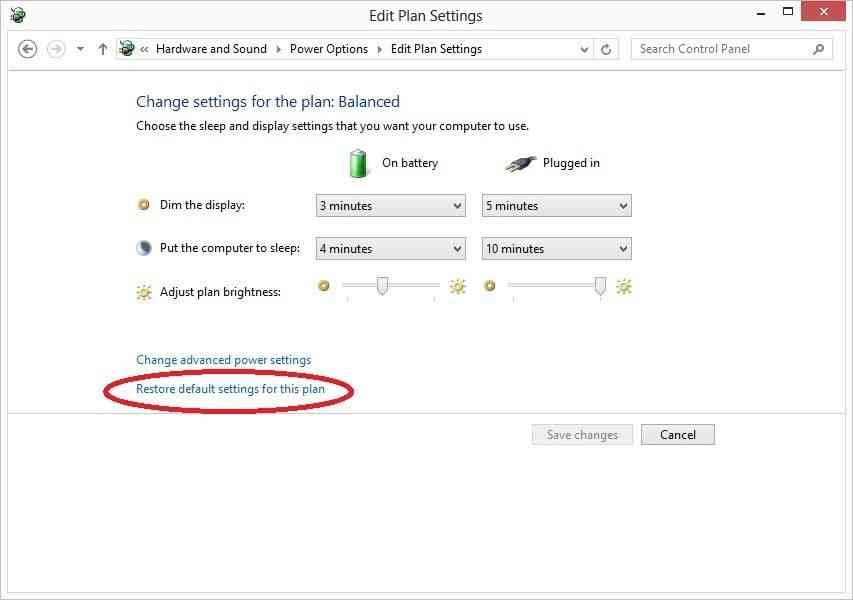
  2. Make sure you reset your battery power profile to default settings.
    restore battery plan
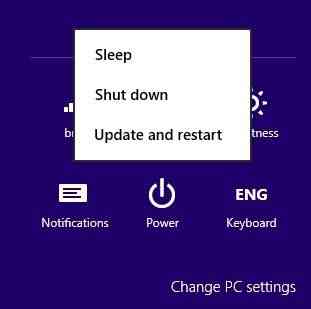
  3. Make sure your PC is not waiting for a Windows update reboot. This could be preventing some standby features. “Update and Restart” via the settings charm –> power button.
    update restart
Of course, check the comments below for more tips. I’ll update this post if anything significant comes up in the discussion.
Connected Standby is an amazing feature but when it doesn’t work as expected it could catch you by surprise. I do expect laptop batteries to drain a lot if I leave the device running overnight but I don’t expect to wake up to a dead Acer W510. Keep an eye on your battery performance by regularly running the powercfg battery report.
For more info on measuring battery usage, see this good article by Intel – must read for all Win 8 developers in my opinion.

Monday, April 29, 2013

虚拟桌面协议

虚拟桌面协议各自对应的平台:
rdp协议对应Windows平台
ica协议对应Citrix平台
PCoIP协议对应vmware平台
spice协议对应RHEV平台

Monday, April 1, 2013

every cloud has a silver lining

every cloud has a silver lining

Wednesday, March 27, 2013

Sql script to drop all constraints on a table

-- t-sql script let to drop all constraints on a table
DECLARE @database nvarchar(50)
DECLARE @table nvarchar(50)

declare @i int
set @i=1

while @i<46 br="">begin

SELECT @database = DB_NAME()
set @table = 'dnt_posts'+ convert(varchar(2),@i)
DECLARE @sql nvarchar(255)
WHILE EXISTS(SELECT OBJECT_NAME(OBJECT_ID) AS CONSTRAINT_NAME FROM sys.objects WHERE type_desc LIKE 'DEFAULT_CONSTRAINT' AND OBJECT_NAME(parent_object_id) = @table)
BEGIN
  SELECT  @sql = 'ALTER TABLE ' + @table + ' DROP CONSTRAINT ' + OBJECT_NAME(OBJECT_ID)
  FROM sys.objects WHERE type_desc LIKE 'DEFAULT_CONSTRAINT' AND OBJECT_NAME(parent_object_id) = @table
exec    sp_executesql @sql
END

set @i=@i+1
end

Go

Saturday, March 23, 2013

年少無知--電視劇【天與地】片尾曲

年少無知--電視劇【天與地】片尾曲

主唱:林保怡.陳豪.黃德斌
作曲:黃貫中
填詞:林若寧
編曲:黃貫中.劉志遠
監製:黃貫中

歌詞

林:年少多好 頑劣多好
不甘安於封建制度裡迷信上街真理會達到
旗幟高舉 群眾聲討
不惜犧牲一切去上訴權貴的想法太俗套
只可惜生活是一堆挫折 只可惜生命是必須妥協

陳:年少多好 貧困多好
一蚊積蓄足以快樂到廉價結他抒發我暴躁
財富得到 年歲不保
捐輸不必講究有回報人世間總會有異數
只可惜生活是一聲發洩只可惜生命是一聲抱歉怕追討

合:如果命運能選擇十字街口你我踏出的每步更瀟灑
如果活著能坦白舊日所相信價值不必接受時代的糟蹋

黃:年少多好 朋友多好
一番爭執不會有被告遊戲競爭不會記入腦
年歲增長 無法修補
青春的詩總會老 時間多恐怖

合:如果命運能選擇十字街口你我踏出的每步無用困惑
如果活著能坦白舊日所相信價值今天發現還未老
如果命運能演習現實中不致接納一生每步殘酷抉擇
留守過去的想法我會否好像這樣生於世上無目的鞭撻

Tuesday, March 19, 2013

CC的真皮护理 动手能力强的看看了

汽车在使用1~2年以后,就容易因为使用不小心所造成的污渍、汗渍的侵蚀,或者可能会出现刮伤、褪色、龟裂的情况。使得本来很高档的车子,显得十分破旧。 垫上坐垫虽然可以掩饰,但真皮的舒适性和装饰性就减弱了。 那如何将真皮坐椅上出现的掉色、局部刮伤、龟裂、老化等现象最大限度地修复?
工具/原料
软刷子、半湿毛巾,干毛巾,处理剂,颜料、喷枪,后处理剂,皮革软化剂,水砂纸,牙刷
具体步骤
1、首先要用软刷子、半湿毛巾重点清洗需要修复、有皱纹的皮面,因为这里的灰尘很多,然后用干毛巾擦干。这样做的目的是为了保证皮革表面的清洁和干爽,后续材料才能更好地渗透皮层。
2、接下来要用水砂纸打磨需要修复的表面,如果有一些龟裂的硬块要除掉,打磨后的皮屑用牙刷刷除。
3、在处理过后的皮革表面涂上皮革软化剂,用来软化发硬的真皮,然后再按照“填充———打磨———填充———打磨”的顺序涂上补伤膏,这一过程就和汽车喷漆里面的“补土”工序一样,只不过施工对象是皮面不是漆面。
4、上色前还要在皮层表面喷一层处理剂,用于除去分解皮层污渍、纤维,然后尽快在60~150秒内上色。上色要对应色卡选定颜料、用喷枪均匀喷涂皮层,最后再喷上起到固色作用的后处理剂。
顺便给喜欢网购的车友分享一下某宝给力的最新购买车品功能,点击这里 所有大众CC专用车品随你挑选,建议收藏备用。

Monday, December 17, 2012

Convert VM from VM Workstation to ESX / ESXi


Importing and exporting virtual machine from a VMWare ESX Server host requires converting that virtual machine’s .vmdk file(s) from one format to another.
Although the underlying technologies work the same, the formatting of the VMDKs differ.
You have 2 options:
1) If you have a running copy of workstation, simply use VMware Converter as you would for any normal conversion, treating the VM as you normally would a physical host in a P2V
2) If you have no working Workstation, you can clone / convert the vmdk at the command line – as I have a fully ESXi lab to play in, I don’t have Workstation running on any machines in my office – as such, when IBM recently supplied a VM for a demo . . that had been created on VM workstation, I had to import it. I used the following process.
Firstly, get hold of an SSH tool ( I use putty)
Next, open a connection to any host that has the storage containing the vmdk presented
In ESX / ESXi, this will be in /vmfs/volumes/
Note: the destination path /dest/folder/vmserver1.vmdk should not contain any existing files with the name ‘vmserver1.vmdk’. If it does the file will be overwritten.
Importing Virtual Disks from GSX Server and Workstation to ESX Server
Before an ESX Server can run a virtual machine created on a different version of VMWare, the virtual disks must first be converted to a format that can be read by the VMFS file system. This is done by running the following vmkfstools command:
vmkfstools -i /.vmdk :.dsk
is the name of the folder from which you are importing from
is the name of the virtual machine file(s) to be imported
is the name of the VMFS partition you are importing to
An example of a complete command would be:
vmkfstools -i /vmfs/volumes/CLRLAB001T1/vmserver1.vmdk /vmfs/volumes/CLRLAB001T1/vmserver1_new.vmdk
Additional information regarding the vmkfstools command can be found in the ESX Server documentation.