http://onlineprofitable.com/affiliate/top-10-list-of-the-best-affiliate-networks
First, if you’re new to affiliate marketing, some preliminary explanations may prove helpful in your quest for becoming a part-time or full-time affiliate marketer.
What is Affiliate Marketing?
Affiliate marketing is quite simple to explain: you promote and market a product or company in return for a commission if a sale or lead is made from your marketing efforts. With online affiliate marketing you simply place your affiliate ID embedded links on your web pages and if a customer clicks your link and proceeds to that designated company’s site and makes a purchase or signs up for a service, you earn a commission.
Affiliate marketing, if done right, can prove to be a very lucrative venture. Commissions can run anywhere from a few pennies to thousands of dollars for just one click or sale. Professional marketers develop affiliate relationships with hundreds of companies and build sites to promote these companies and products.
Needless to say, the advent of the Internet has been a golden opportunity for affiliate marketers to really expand their promotions and marketing. As more as more customers choose to buy online, advertising and purchases keep increasing at a maddening pace.
To accommodate all this online ecommerce we have seen the birth of large affiliate networks, operated by large corporations. Make no mistake, affiliate marketing is big business, accounting for billions in sales and commissions.
What is an Affiliate Network?
An affiliate network is a third party facilitator which brings affiliates and companies together. It connects Advertisers (companies with products or services to sell) together with Publishers (those who display and promote these products or services) so they can do business. The affiliate network does all the tracking, accounting and payment of commissions.
The following Top 10 list of the best Affiliate Networks is compiled by an actual full-time affiliate marketer who has worked these programs for over five years. This list is subjective and based on first-hand experience. It should be seen in this light and every marketer probably will have a different list or have these in a different picking order depending on the type and nature of their marketing.
But this list of the 10 Best Affiliate Networks will give you a general rundown on these affiliate networks and how they operate.
1. Commission Junction (www.cj.com)
Now owned by ValueClick, Commission Junction was one of the first affiliate networks. It is also one of the most important with many of the Top Fortune 500 companies listed here.
CJ is an international network with excellent stats and tracking (some of the best you will find), along with regular monthly payments makes this the obvious first choice for anyone wishing to try affiliate marketing. For those new or old at affiliate marketing, CJ also holds regular seminars and training sessions.
Most merchants offer pay-per-lead or pay-per-sale, one of the best features is the performance bonuses and incentives. As most experienced marketers will know, selling 50k to 100k each month for merchants will bring in the big incentives or bonuses.
Commissions run as high as 50% but most are in 3% to 15% range. You have the option of direct deposit for your payments. One major plus, CJ will tell you which merchants and ads are earning the most revenue for affiliates so you can easily choose which merchants are worth promoting.
2. ClickBank (www.clickbank.com)
ClickBank is another professional affiliate network with excellent stats and tracking. Easy to use and pays every two weeks.
ClickBank is slightly different from the other networks in that it deals mainly with digital download products. The commissions from ClickBank are usually much higher than the other networks, around 40% to 50% or more.
ClickBank has over 10,000 products but keep in mind, info-marketing products will have stiff competition from all the savvy and well established Internet marketers promoting these same products. Consider youself warned!
The most successful marketing tactic here is to first dominate your targeted niche with your blogs and sites, then find affiliate products to match your content or niche subject matter, whether it be gardening equipment, gaming laptops or Mediterranean cruises!.
3. LinkShare (www.linkshare.com)
LinkShare is another excellent affiliate network. It is one of the oldest affiliate networks on the web. LinkShare was recently acquired by the Japanese Portal Rakuten, with a price tag of $425 million.
Very good stats and reporting with their Synergy Analytics system. Many Top Fortune 500 companies are presented here so you will no trouble finding products and services to promote. LinkShare pays commissions as they receive them from merchants – monthly checks.
4. Affiliate Window (www.affiliatewindow.com)
Affiliate Window is an UK based affiliate network which offers top brand companies and good commission rates. Pays once a month and has excellent stats.
Savvy affiliate marketers know promoting in other countries can be much easier than promoting in the American market place. Mainly because these other countries haven’t become saturated with online marketers, little competition means more sales.
5. Amazon (www.amazon.com)
Amazon is another excellent affiliate network to join if you want to sell products from your site or blog. Amazon has excellent stats and the links are very easy to create and place on your web pages.
You also have the option of creating your own store with Amazon aStores. Amazon also now has context link ads and Widgets!
Commission rates are somewhat lower than the other networks but making sales thru Amazon is much, much easier. You will make more sales mainly because Amazon is a well known and trusted online company. Amazon now pays monthly.
6. Shareasale (www.shareasale.com)
Shareasale is yet another easy system to work with good stats and simple to create links. With 1,700+ merchants to choose from, Shareasale is another good affiliate network to promote.
The control panel is easy to use and the reporting is very good. Usually pays the month following your sales.
7. Google (www.google.com/adsense/)
Many won’t think of Google as an Affiliate network but it does run affiliate products thru its Adsense program. Very few products but like everything from Google it is professionally run and top caliber all the way.
Please note, top marketers know affiliate links/products on their content pages will return 10 times what Google Adsense will give them. However, these marketers will also know using Google Adsense on less targeted pages throughout your sites or blogs will give you a healthy return.
Besides receiving that monthly check from a multi-billion dollar company like Google will put a smile on your face every time.
8. LinkConnector (www.linkconnector.com)
LinkConnector is a relatively new affiliate network which launched in 2004. It has Pay Per Click, Pay Per Sale and Pay Per Lead. Good stats and reporting. Worth checking out for their different types of new affiliate technology such as Direct Linking which passes pagerank along to the merchant’s site.
9. CPA Empire (www.cpaempire.com)
Great CPA (Cost Per Action) network especially if you do a lot of email marketing and promotions. Geared towards acquiring leads and sign-ups but does offer other merchants as well. Good stats and reporting.
10. Independents
Individual affiliate deals with different companies which may or may not be listed with the major networks above. Your independent affiliate deals will be some of your most lucrative since you can sometimes work out separate private commission rates and bonuses. Aim for residual income here. Don’t ignore this aspect of affiliate marketing as it will pay the highest dividends.
Keep in mind, all the above affiliate networks are middlemen, they come between you and the merchant you’re promoting. For affiliates with a proven track record, who have shown they can deliver the customers and sales, a private deal cutting out the middleman/fees can prove very beneficial for both parties. If you’re fortunate enough to become known as a super affiliate, these private deals will become more common and more profitable.
Professional affiliate marketers use all of the above networks to create multiple income streams from their marketing efforts. In the process, they build a healthy monthly income for themselves and their families. There is no reason why you can’t do the same.
Friday, September 3, 2010

Thursday, September 2, 2010
Install Snow Leopard in VMWARE 7 Windows Edition
http://www.ihackintosh.com/2009/12/install-snow-leopard-in-vmware-7-windows-edition/
How to install Snow Leopard in VMWARE 7 and Windows host ? Virtualization of Snow Leopard (Client) is not officially supported/allowed by any virtualization solution. However a few modifications to the .vmx file and use a modified install disk as this will save a lot of trouble. Let me clear Apple licensing does not allow for the virtualization of OSX Client on any hardware and only allows for the virtualization OSX server on Apple hardware. Anything else is in violation of the license agreement. This article is for informational purposes only, you can never achieve full utilization of Mac OS X on VMWARE. So if you like the Mac then go ahead and buy a Mac.
Also Check — Snow Leopard in VMWARE Post Installation Fixes and Tweaks for sound, graphics related mods after installation.

 Step Two : Edit the VMWARE settings eg: Memory, Processor, Networking Adaptors etc. Select CD/DVD drive options and in Connection select Use ISO image file and browse the Darwin_Snow.iso
 Step Three : Now power on the virtual machine and keep your finger on F8 key.
 Hit F8 very quickly on your Keyboard you will be prompted with the following screen

Step Four : Like Boot 132 method now you need to replace the boot cd with the Snow Leopard Retail Install DVD. Right click on the CD icon in bottom of the VMWARE windows and click on Settings option.

Now change the options from ISO image to use physical drive and make sure you have Retail DVD already installed. Save and Exit
Step Five : Now navigate to boot screen and press “C” on your keyboard to select “Boot DVD”, again press F8 for advance options and type -v at the boot prompt then hit enter for booting with verbose mode.
Step Six : Now wait for 2-3 minutes and your Installation screen will appear. Now you can install Snow Leopard as usual. Before choosing the destination open Disk Utility and erase your Vmware HDD in to “Mac OS Extended (Journaled)” format type. Under customization deselect printer drivers and language translations for trouble free installation.Once installation finishes your virtual machine will reboot automatically.
Step Seven : Follow Step Two again “Select CD/DVD drive options and in Connection select Use ISO image file and browse the Darwin_Snow.iso” now you can boot in to Snow Leopard you may need to force restart 2-3 times if Kernel Panic happens, once machine boot successfully you can set your preference etc.
How to install Snow Leopard in VMWARE 7 and Windows host ? Virtualization of Snow Leopard (Client) is not officially supported/allowed by any virtualization solution. However a few modifications to the .vmx file and use a modified install disk as this will save a lot of trouble. Let me clear Apple licensing does not allow for the virtualization of OSX Client on any hardware and only allows for the virtualization OSX server on Apple hardware. Anything else is in violation of the license agreement. This article is for informational purposes only, you can never achieve full utilization of Mac OS X on VMWARE. So if you like the Mac then go ahead and buy a Mac.
Also Check — Snow Leopard in VMWARE Post Installation Fixes and Tweaks for sound, graphics related mods after installation.
More Article of Interest
- How to Install Snow Leopard (10A432) on PC Hackintosh
- Install Snow Leopard 10.6 on AMD PC Hackintosh
- How to Convert Snow Leopard Retail Disk to .DMG
Requirements
- VMWARE 7 and Windows XP, Vista or 7
- Retail DVD of Mac OS X Snow Leopard 10.6
- Intel Based Machine, AMD isn’t supported.
- Patience, a Cup of coffee or Energy drink whatever you like.
- A pre-made Snow Leopard VMDK, dariwn_snow.iso Download (Rapidshare), (Rapidshare 1)(Mediafire) Or (Megaupload)
Instructions
Step One : Launch VMWARE Workstation and load the .vmx that came with the package you downloaded above. Now edit virtual machine settings for advance options.
 Step Two : Edit the VMWARE settings eg: Memory, Processor, Networking Adaptors etc. Select CD/DVD drive options and in Connection select Use ISO image file and browse the Darwin_Snow.iso
 Step Three : Now power on the virtual machine and keep your finger on F8 key.
 Hit F8 very quickly on your Keyboard you will be prompted with the following screen
Step Four : Like Boot 132 method now you need to replace the boot cd with the Snow Leopard Retail Install DVD. Right click on the CD icon in bottom of the VMWARE windows and click on Settings option.

Now change the options from ISO image to use physical drive and make sure you have Retail DVD already installed.
 Save and Exit
Step Five : Now navigate to boot screen and press “C” on your keyboard to select “Boot DVD”, again press F8 for advance options and type -v at the boot prompt then hit enter for booting with verbose mode.
Step Six : Now wait for 2-3 minutes and your Installation screen will appear. Now you can install Snow Leopard as usual. Before choosing the destination open Disk Utility and erase your Vmware HDD in to “Mac OS Extended (Journaled)” format type. Under customization deselect printer drivers and language translations for trouble free installation.Once installation finishes your virtual machine will reboot automatically.
Step Seven : Follow Step Two again “Select CD/DVD drive options and in Connection select Use ISO image file and browse the Darwin_Snow.iso” now you can boot in to Snow Leopard you may need to force restart 2-3 times if Kernel Panic happens, once machine boot successfully you can set your preference etc.
Known Issues
- Some .dmg aren’t opening
- Kernel Panic on every shut down so just force shut down after every kernel panic.
How to bookmark a page in PDF
http://www.pdfhacks.com/bookmark_page/
Ebooks are usually in the PDF format, so it would be useful if you could bookmark a page on a PDF file you are reading, just like you bookmark a page in a real book. That can be done in Acrobat Reader with a small hack. Now Acrobat Reader is such a resource hog that you might not want to use it. Even I don't use it. Recently, I wrote about another PDF reader, the Adobe Reader Lite which is much faster and lighter than the original version. This hack works with the Lite version too.
Download Bookmark JavaScript for Acrobat Reader. Unzip it, and then copy it into your Acrobat Reader JavaScript's directory (/Adobe/Reader 8.0/Reader/Javascripts). Now open any PDF file with Acrobat Reader or Acrobat Reader Lite. Scroll a few pages and then open the View menu. Here you will find 4 new options - Bookmark this page, Go to bookmark, Remove bookmark and Clear bookmarks. (Note: you can't see the bookmark items when a PDF file is opened to the first page. You have to get to at least the second page for the bookmark items to become visible). The items are self explanatory. You can create as many bookmarks you want in a single PDF file. "Remove bookmark" will allow you to remove a single bookmark and "Clear bookmarks" wipes out all the bookmarks.
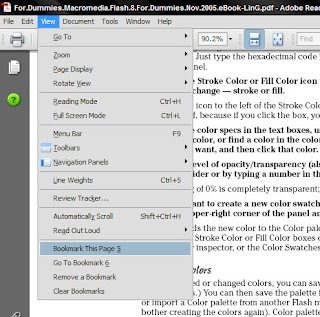
The bookmarks created by this JavaScript aren't PDF bookmarks that get saved with the document. They behave more like web browser bookmarks in that they enable you to quickly return to a specific PDF page.
Ebooks are usually in the PDF format, so it would be useful if you could bookmark a page on a PDF file you are reading, just like you bookmark a page in a real book. That can be done in Acrobat Reader with a small hack. Now Acrobat Reader is such a resource hog that you might not want to use it. Even I don't use it. Recently, I wrote about another PDF reader, the Adobe Reader Lite which is much faster and lighter than the original version. This hack works with the Lite version too.
Download Bookmark JavaScript for Acrobat Reader. Unzip it, and then copy it into your Acrobat Reader JavaScript's directory (/Adobe/Reader 8.0/Reader/Javascripts). Now open any PDF file with Acrobat Reader or Acrobat Reader Lite. Scroll a few pages and then open the View menu. Here you will find 4 new options - Bookmark this page, Go to bookmark, Remove bookmark and Clear bookmarks. (Note: you can't see the bookmark items when a PDF file is opened to the first page. You have to get to at least the second page for the bookmark items to become visible). The items are self explanatory. You can create as many bookmarks you want in a single PDF file. "Remove bookmark" will allow you to remove a single bookmark and "Clear bookmarks" wipes out all the bookmarks.

The bookmarks created by this JavaScript aren't PDF bookmarks that get saved with the document. They behave more like web browser bookmarks in that they enable you to quickly return to a specific PDF page.
Best movies download web sites list
1. http://wwws.x1949x.com/ blog: http://xiaolangwo8.spaces.live.com/
Wednesday, September 1, 2010
Which is the best online FLV,online video converter?
Compared many web site, the http://www.zamzar.com/ is best so far.
Free online file conversion, and it lets u upload file ...much convenient than the other web site.
Free online file conversion, and it lets u upload file ...much convenient than the other web site.
Dot Net Resource
Devexpress Asp.net Control: http://www.devexpress.com/
Download http://download.chinaprj.cn/tag/isOEb/
Download http://download.chinaprj.cn/tag/isOEb/
Subscribe to:
Posts (Atom)